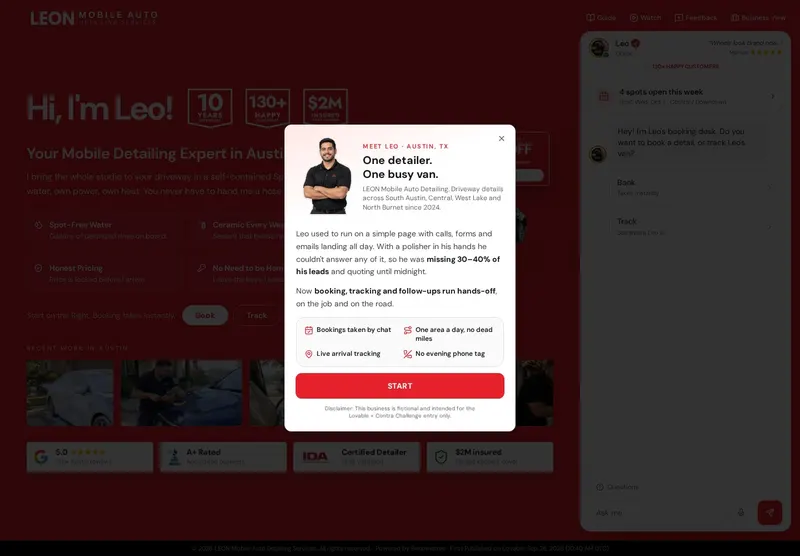
01 · The booking problem
A booking is more than a name and a date.
For a mobile detailing service, a useful request needs to connect several decisions: which vehicle needs work, which service fits, where it is located, whether extra work is needed, and when a visit can happen. A calendar answers only part of that problem. A generic enquiry form can collect information, but it often leaves the customer unsure about price, coverage, or what happens next.
The LEON experience brings service information and a guided booking desk together. Instead of asking visitors to assemble the request themselves, the screen introduces choices in a sequence. Each question builds on the service context, while the surrounding page explains the offer. The aim is to make the request understandable before asking for a commitment.
These are design challenges the project addresses, not claims about LEON’s previous system or measured business results. LEON identifies itself as a fictional business created for the Lovable × Contra Challenge. This walkthrough documents its public demonstration, not a live client operation. Sample identifiers are hidden in the new tracking and business captures. Prices, policies, financial figures, and service photographs illustrate the demo; they are not real customer outcomes or current service quotations.
02 · Customer view
One decision at a time, with the context kept visible.
The customer journey combines practical service information with conversational choices. These seven screens show the public booking path through its final details and deposit request; they do not demonstrate a completed transaction.
Screen 01
Start with the customer’s reason for visiting
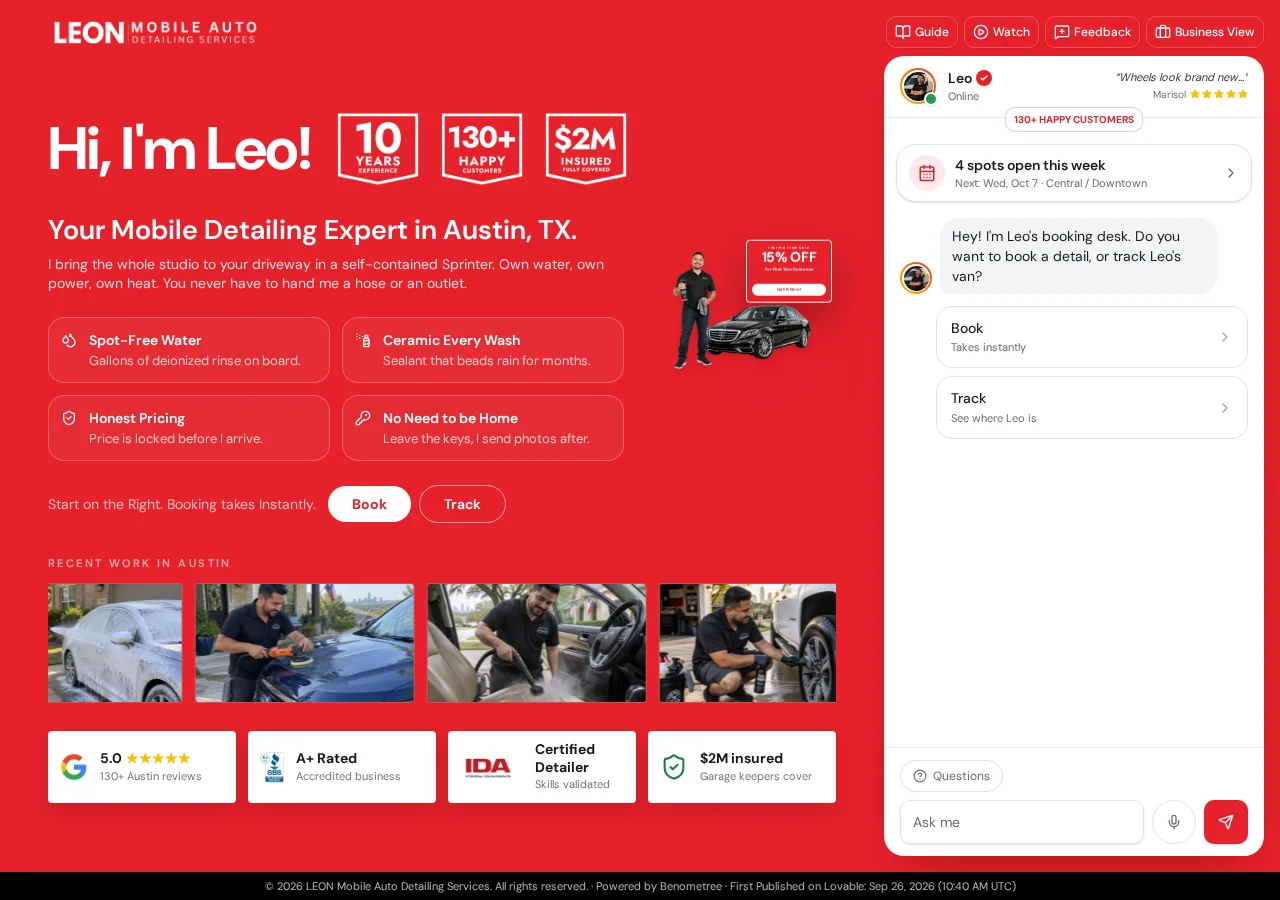
The opening screen gives the visitor two distinct paths: book a service or track an existing booking. This is a small but important distinction. A returning customer checking an arrival should not have to move through the same service-selection journey as someone arranging their first detail.
Service information, recent-work images, and trust signals sit beside the conversation rather than on an unrelated page. The customer can inspect the offer while deciding what to do next. The booking desk then presents the next question in context, instead of exposing every field at once.
The intended benefit is a clearer starting point. This is not evidence of a measured reduction in abandonment; it is a design decision that keeps the primary actions close to the information supporting them.
Screen 02
Choose the vehicle before choosing the detail
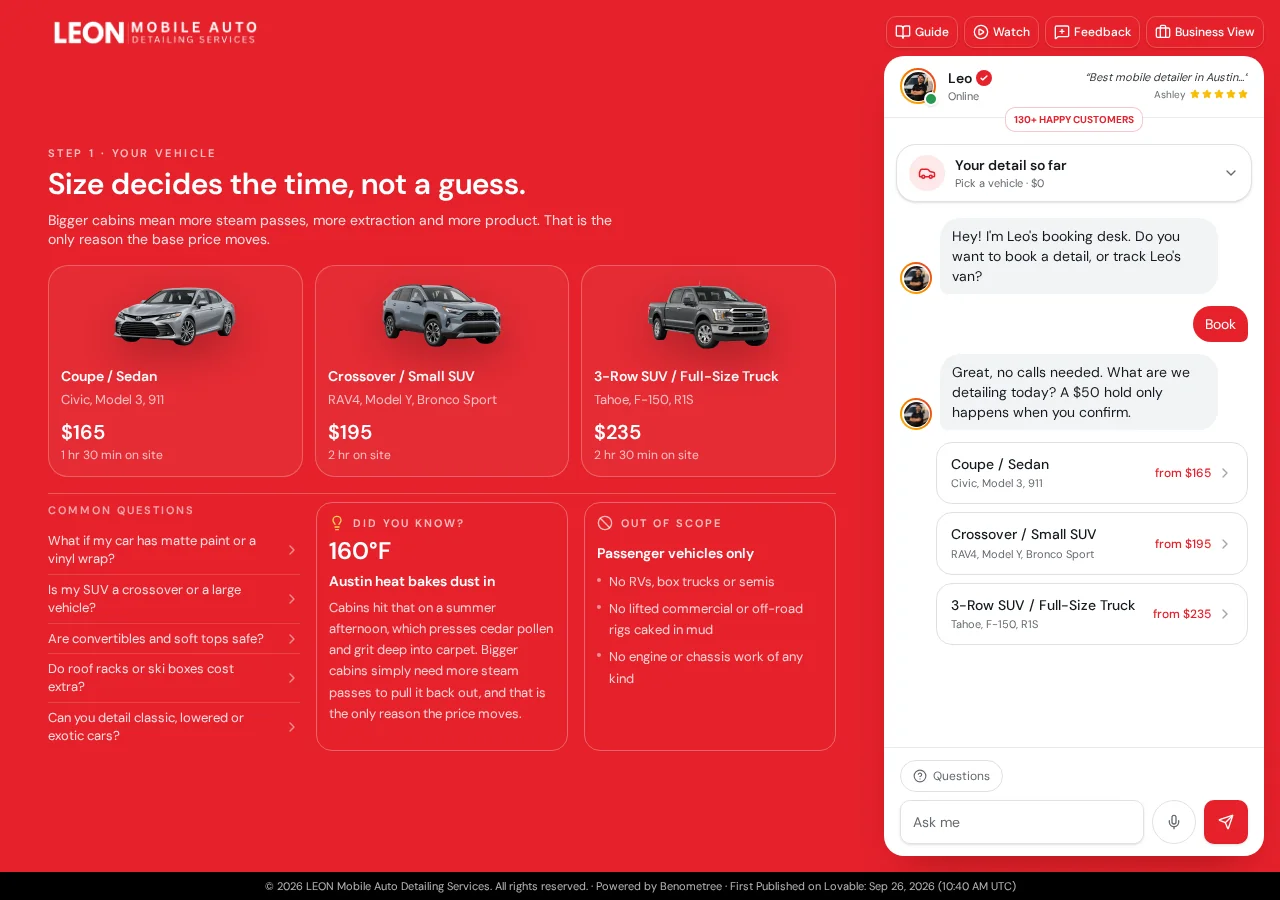
A detailing service is not the same job for every vehicle. The vehicle screen separates coupe or sedan, crossover or small SUV, and larger SUV or truck choices. Each category displays a starting price and time information, helping the visitor understand that the quote depends on the work involved.
Putting this question early makes the later package selection easier to interpret. The conversation keeps a visible record of the selected vehicle, so the customer can see the context behind subsequent questions rather than relying on memory.
For a business considering a similar system, the lesson is to identify the factor that changes the service first. That factor might be vehicle size, property type, number of rooms, or job duration. It should influence the journey instead of being treated as an incidental note at the end.
Screen 03
Make the service area part of the booking decision
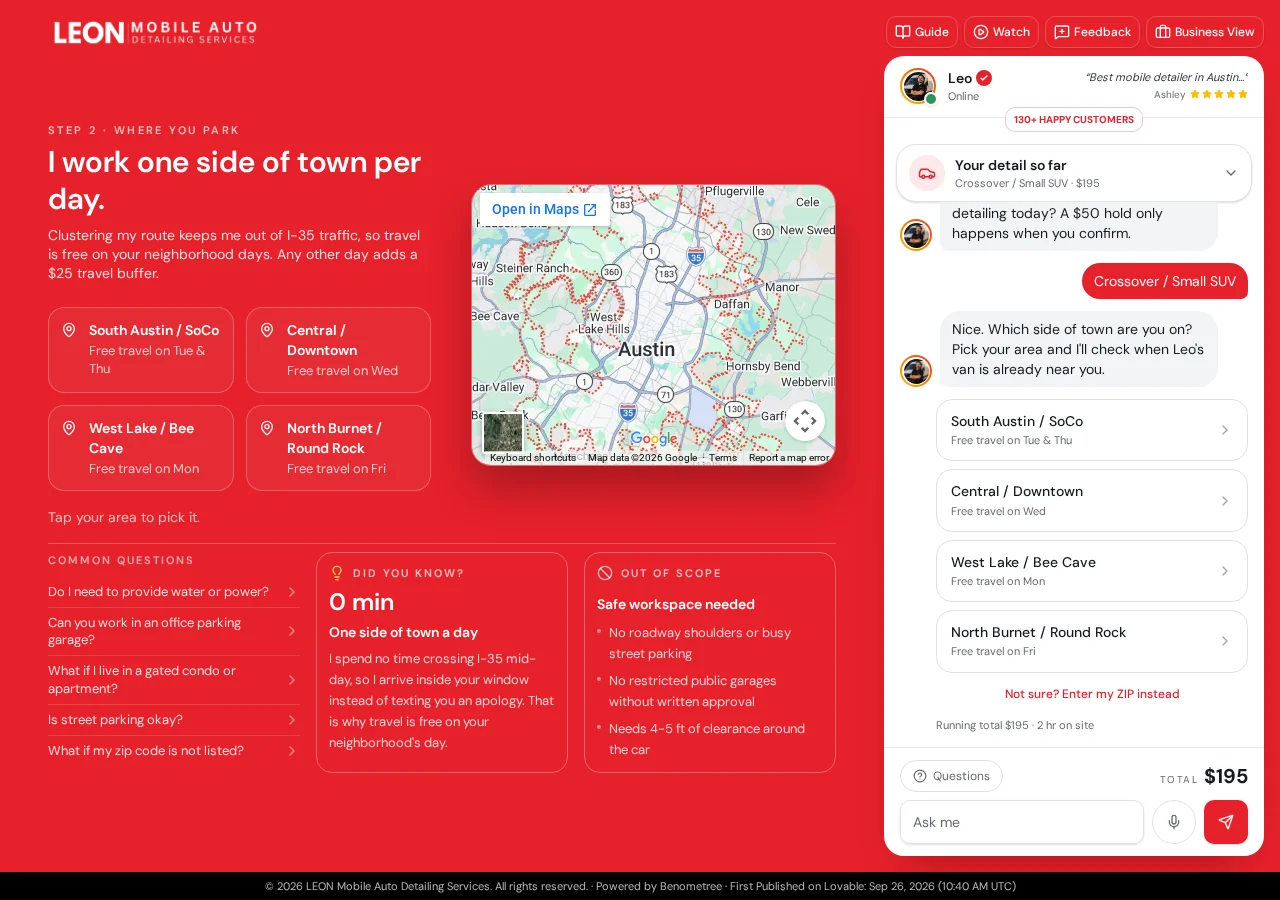
Mobile service introduces a question that a fixed-location appointment does not: where must the operator travel? The service-area screen shows named Austin zones, a map, and travel-day information alongside the conversation. Coverage is presented as part of choosing the service, not as a surprise after the request is submitted.
The map supports recognition, while the zone names provide actionable choices. Together they help a visitor connect their location with the booking options. The screen also gives someone outside the listed area a different path rather than requiring them to guess which zone to select.
The design connects customer convenience with the constraints of a mobile working day. It illustrates why a booking tool needs more context than a calendar alone. It does not, by itself, prove automatic route optimization or guarantee travel savings.
Screen 04
Explain packages before asking for a choice
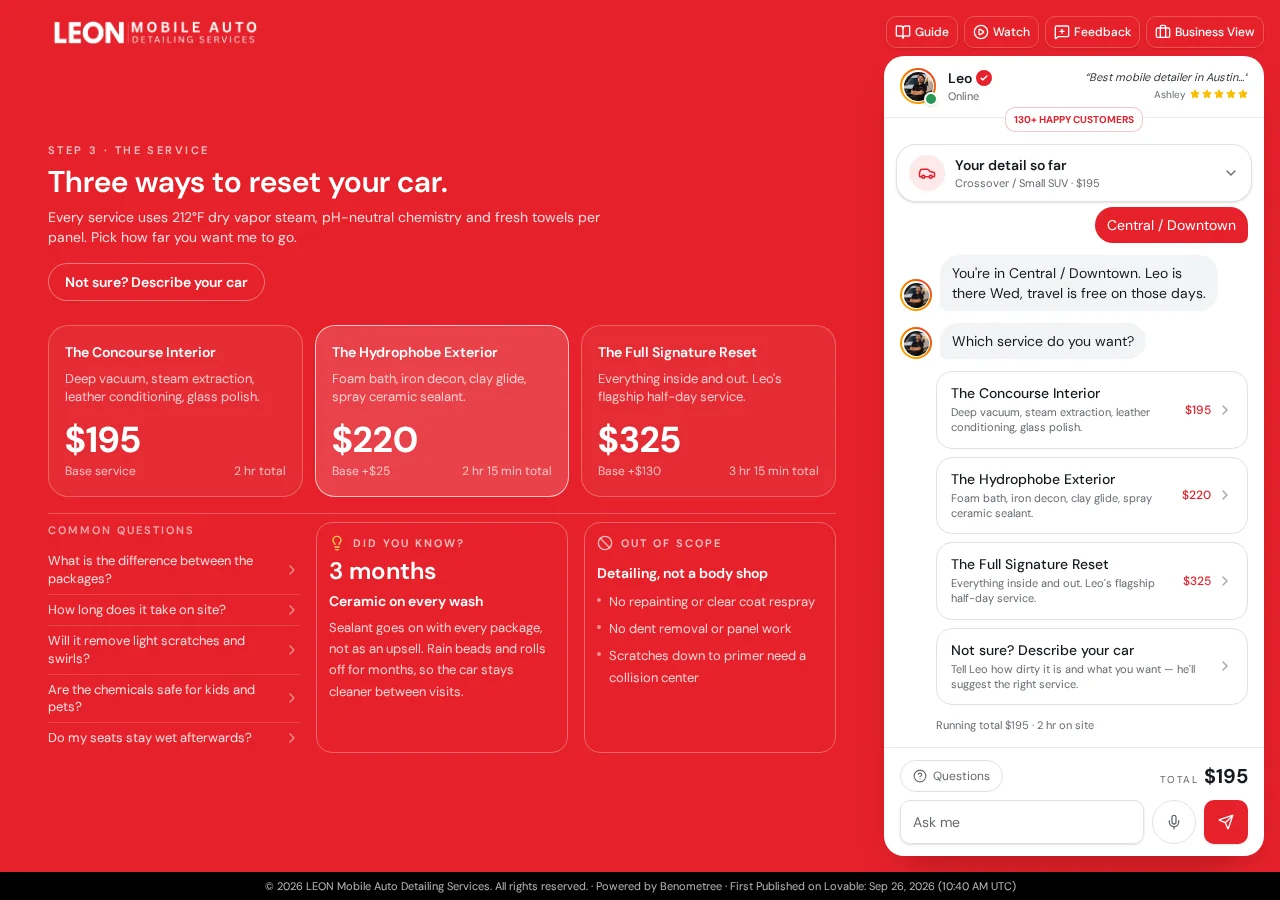
Package names can be difficult to compare when they do not explain the work. LEON’s package screen presents interior, exterior, and full-signature choices with descriptions and prices. The customer can compare the scope before selecting the next conversational option.
The selected vehicle remains part of the booking context. This preserves the connection between what is being serviced and which package the customer wants. The interaction is a guided service-selection journey, not simply a contact form styled to look like a conversation.
A useful booking experience makes the differences between services understandable. It should help a customer choose the right scope, not merely push the largest package. In this example, visible descriptions give the decision a practical basis without requiring a separate phone enquiry.
Screen 05
Ask about extras only after the core service is clear
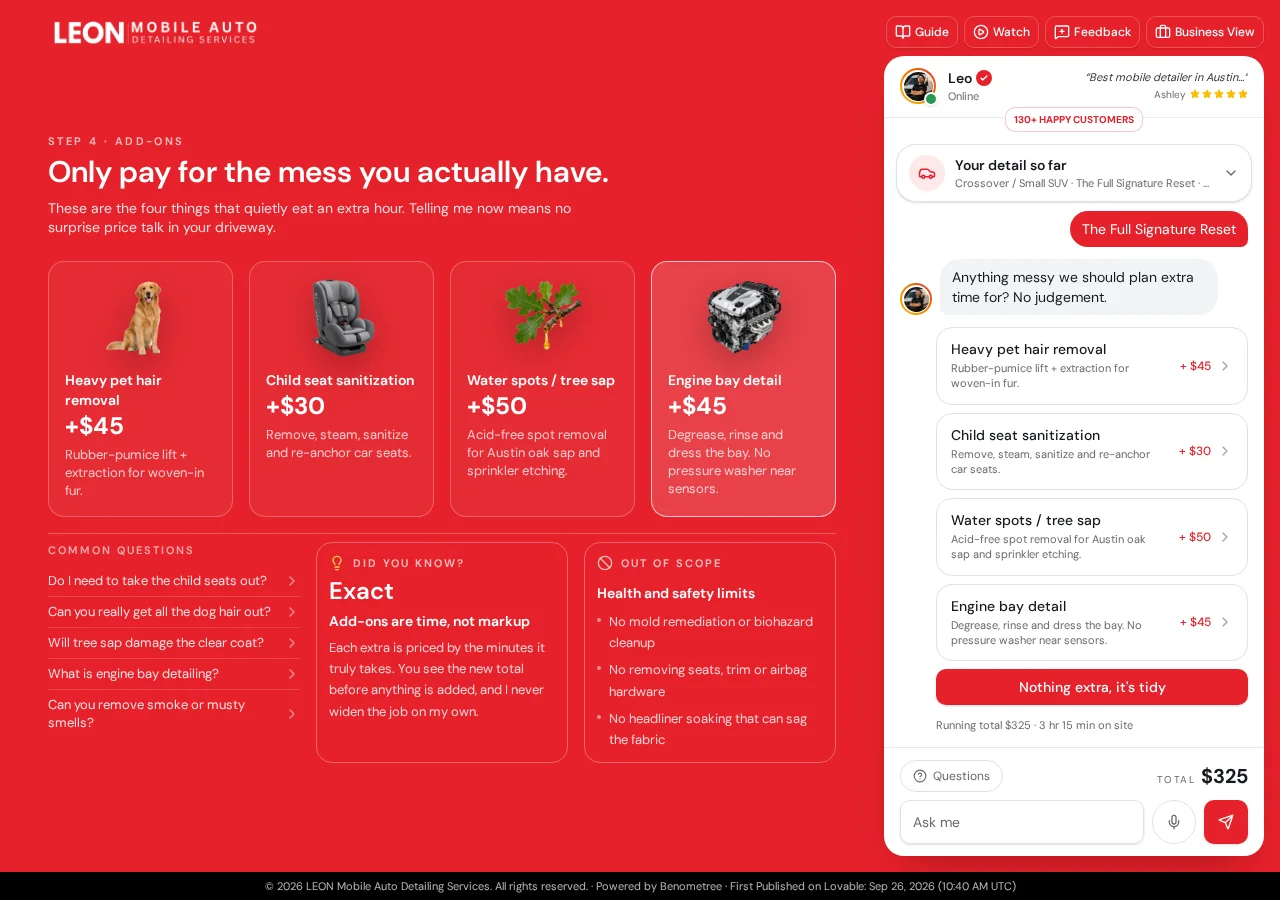
The add-on screen identifies conditions that can change the work: pet hair, child-seat sanitation, water spots, and engine-bay detailing. Each extra is presented separately with a price. Customers can distinguish the standard package from work that applies only to their vehicle.
The conversation gives the visitor a way to say that no extras are needed. That matters because an optional step should not feel like a mandatory purchase. Keeping add-ons after the package also gives the visitor a reference point for understanding what is additional.
For the business, structured choices are intended to make the requested scope more explicit. A production system still needs accurate service definitions and handling for unusual conditions. A screenshot demonstrates how the request is collected; it does not establish how every exceptional job is priced or approved.
Screen 06
Present arrival expectations alongside the window
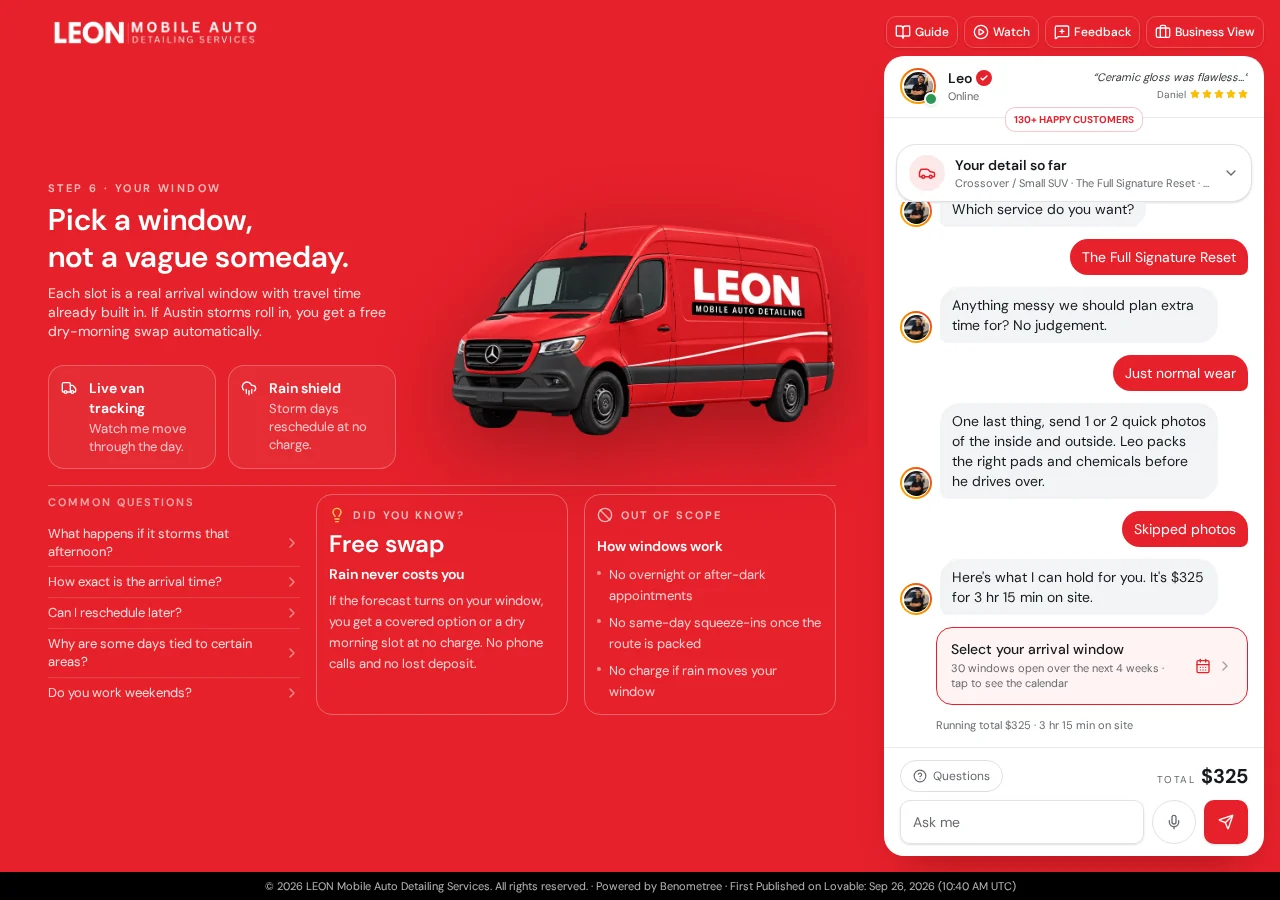
A mobile appointment creates uncertainty about arrival as well as availability. The arrival-window screen introduces the scheduling choice with explanations of van tracking and weather-related rescheduling. The customer sees these expectations at the point where they are relevant to the decision.
The captured conversation also shows that earlier answers remain visible as the booking progresses. This helps the customer review the selected service while considering the next step. A progressive journey should preserve context, not replace one long form with a sequence of disconnected questions.
Weather policies and arrival promises need to match the actual service operation. Here, they are visible statements in the illustrated experience. The screen is not independent proof of weather automation, continuously available appointment inventory, or a particular arrival-time accuracy.
Screen 07
Bring contact details, deposit, and total together
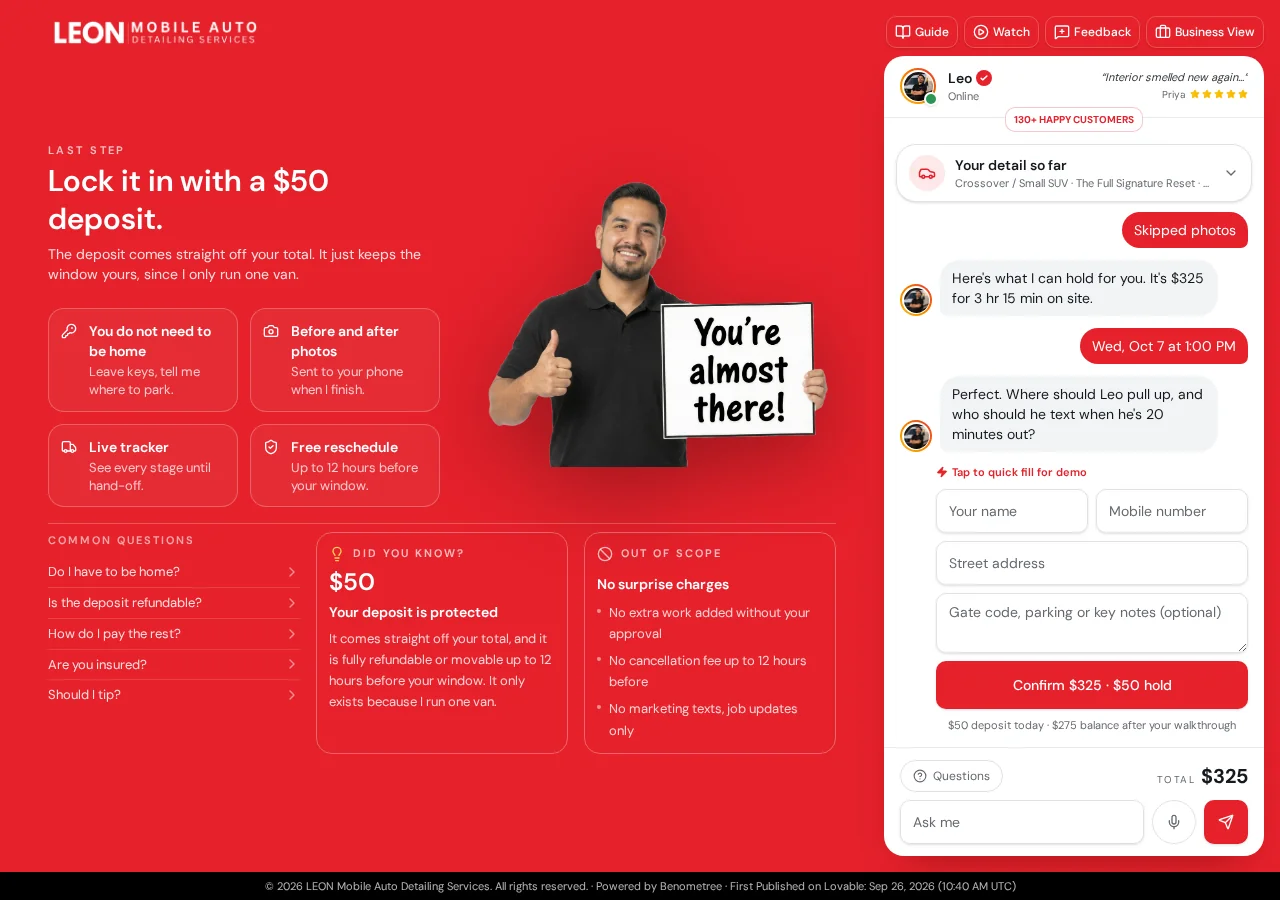
The final captured booking screen asks for the information required to visit the customer: name, mobile number, address, and an optional gate code or parking note. The service total remains visible beside the confirmation action, while the deposit explanation gives the customer context for the hold.
Asking for personal details after service selection means the visitor can first understand the offer and decide whether it fits. It also makes the purpose of the address and parking notes clear: this is an on-site service, not a generic enquiry.
The screen displays a deposit request, but this case study does not establish a completed payment transaction. Before launching a similar product, payment handling, booking confirmation, failed submissions, privacy, and rescheduling rules must be tested against the intended operation. A polished final screen is only one part of a dependable booking system.
03 · Tracking View
Keep the customer informed after the booking.
The public demo offers active and completed visits. Together they show how the experience moves from arrival expectations to service evidence, settlement, and follow-up.
Feature 01
Turn a confirmation into a useful visit companion
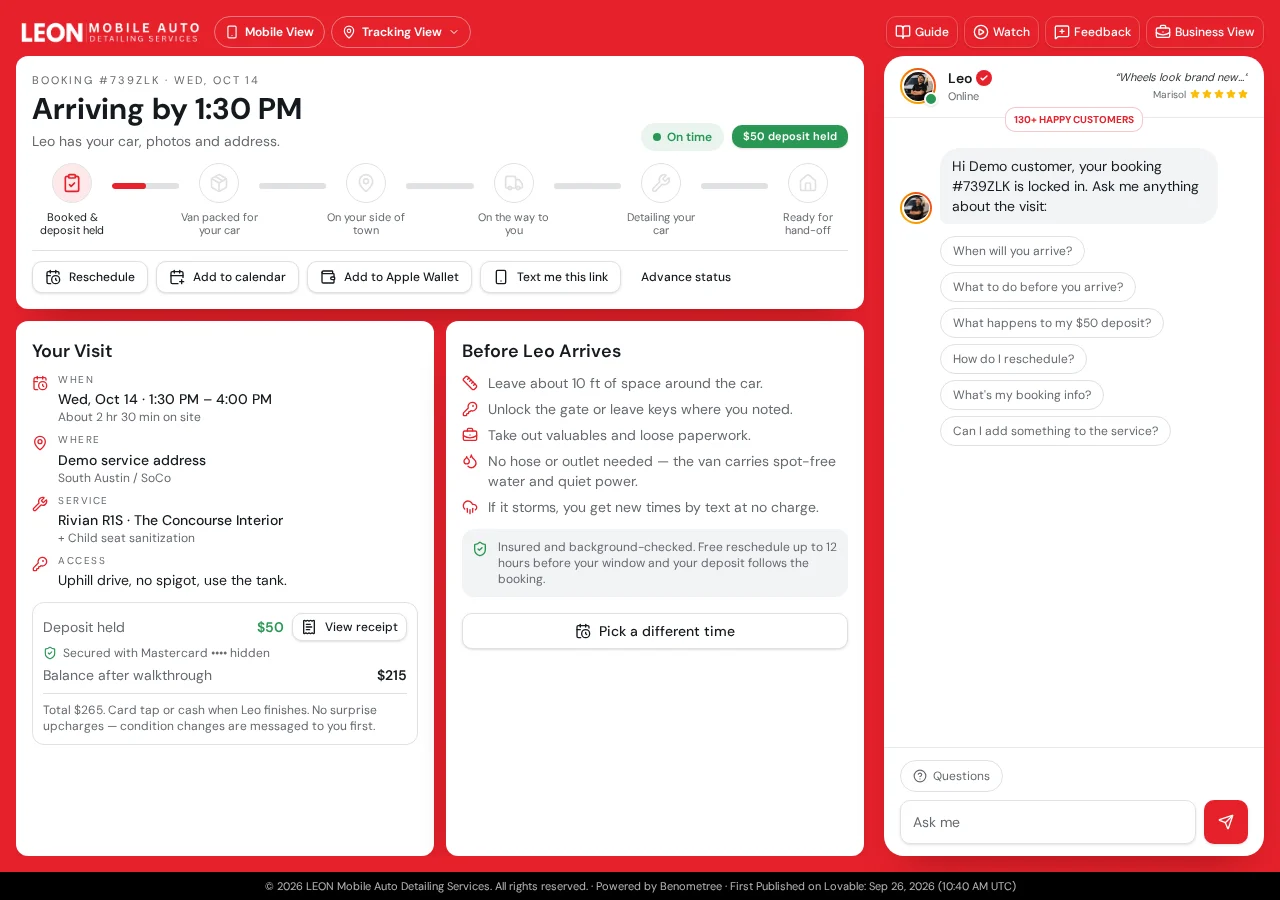
The Tracking View does more than acknowledge a booking. It brings the arrival headline, appointment window, vehicle, package, add-ons, service area, and access instructions together. A customer can check what was arranged without searching for an old email or repeating the details to the operator. The preparation checklist explains space around the vehicle, keys, valuables, and the van’s self-contained equipment.
Six stages make the visit understandable: booked and deposit held, van packed, on your side of town, on the way, detailing, and ready for hand-off. These labels translate operational progress into customer language. The demo includes an Advance status control for illustrating the sequence; it should not be mistaken for proof of a live GPS feed. The inspected active screen is a status tracker, not a demonstrated geographic vehicle map.
The payment summary separates the deposit from the remaining balance and displays the service total. That distinction answers “what have I already paid?” and “what happens when the work finishes?” without mixing a booking hold with full settlement. The receipt control offers a way back to the financial record, although the demo is not evidence of an actual card charge.
Feature 02
Let the customer manage changes without starting over
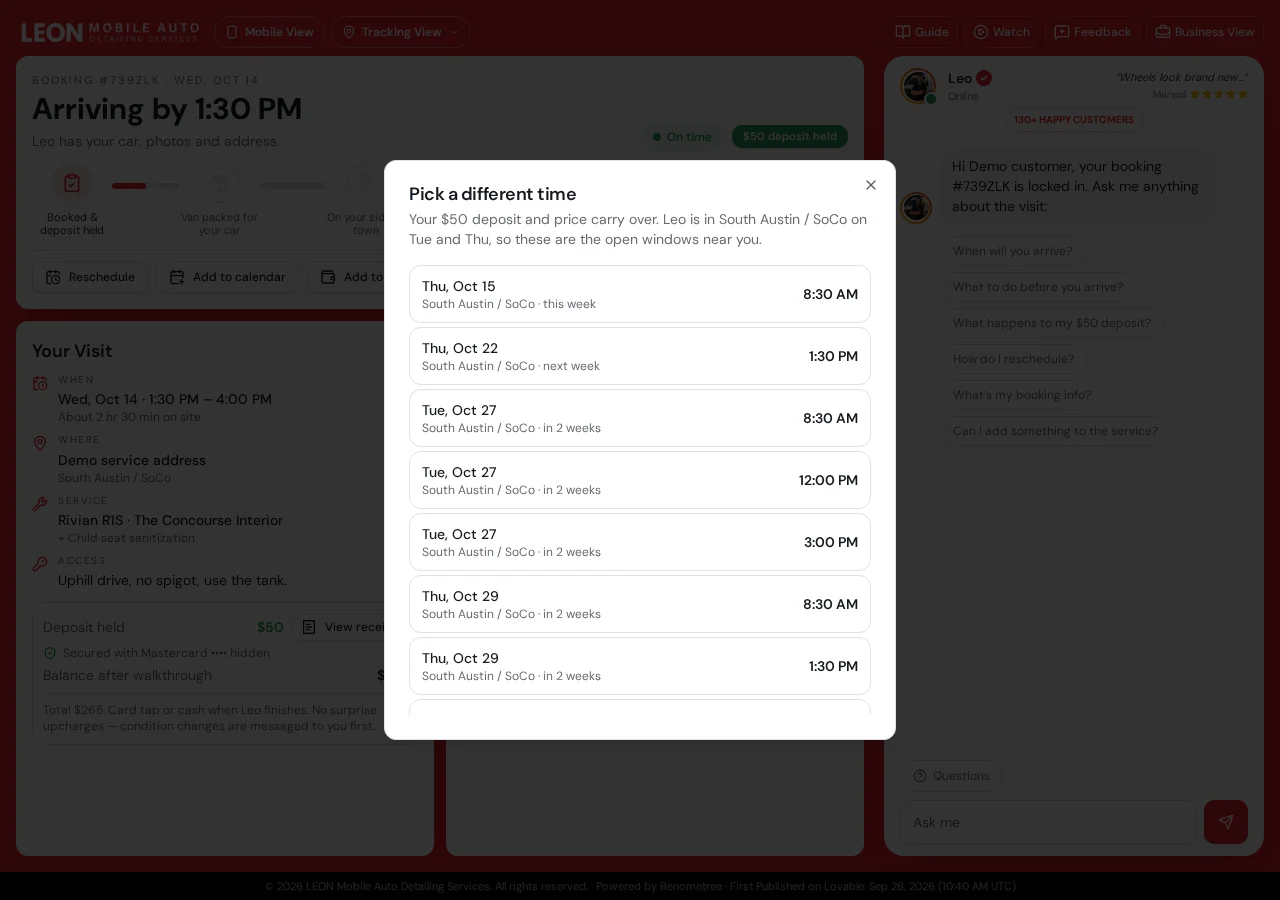
Reschedule opens a choice of dated arrival windows instead of sending the customer back through vehicle and package selection. The panel relates those choices to the customer’s service zone and explains that the existing price and deposit carry over. It also exposes a separate option for another area. This makes the consequences of a schedule change visible before a new choice is made.
The active tracker also presents Add to calendar, Add to Apple Wallet, and Text me this link controls. Their purpose is to make the booking easy to find again in the places customers already use. The controls were observed, but external wallet delivery, text delivery, and calendar integration were not verified as production services during this review.
A booking-aware conversation remains alongside the visit. Suggested questions cover arrival, preparation, the deposit, rescheduling, booking information, and extra services. Keeping that help attached to the appointment is intended to reduce repeated explanations. Automated answers still need accurate service rules and a reliable escalation path; a chat interface alone is not a guarantee that every answer is correct.
Feature 03
Keep the hand-off, receipt, and follow-up in the same journey
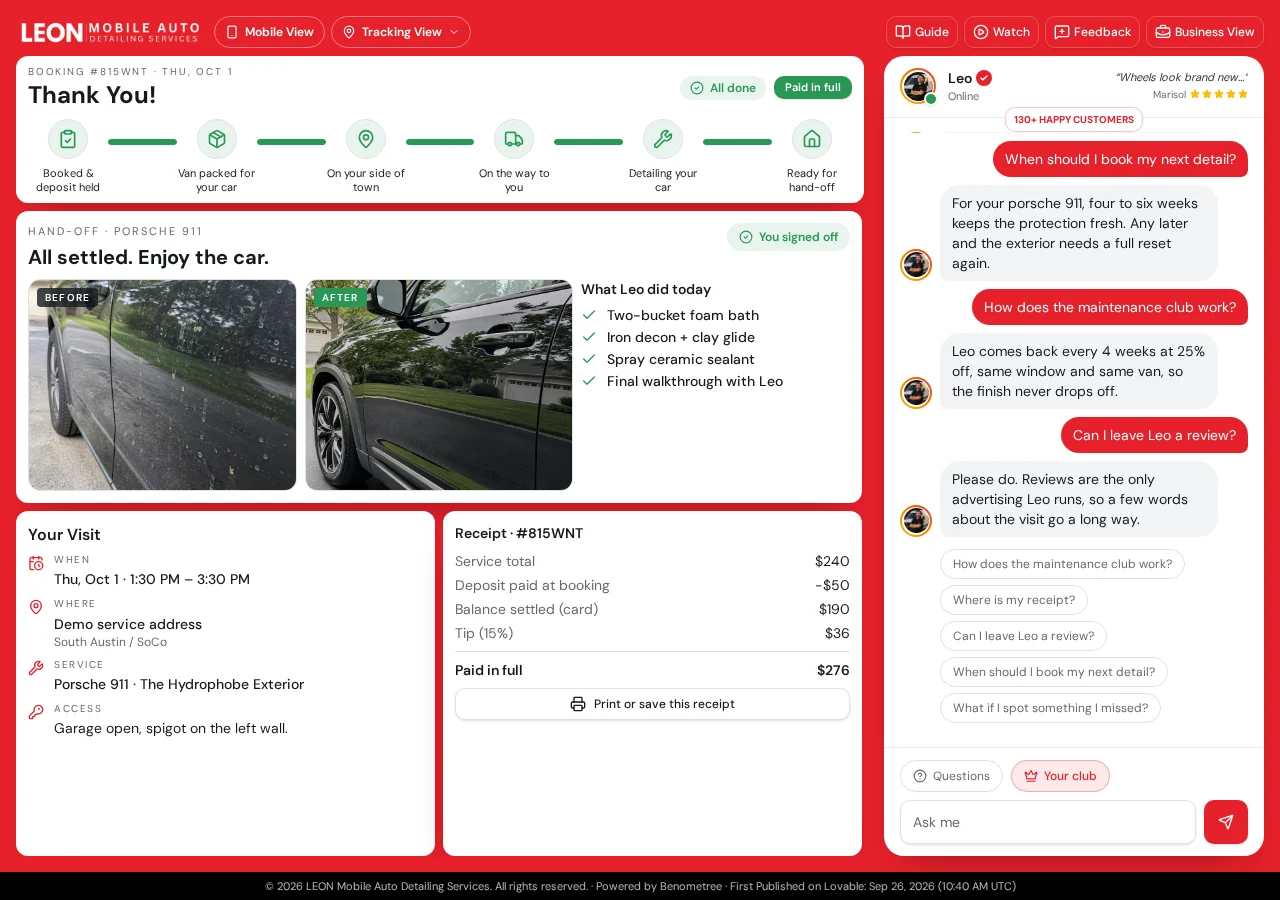
The completed Tracking View changes its emphasis. All done and Paid in full replace the arrival headline, while the hand-off section shows before-and-after photos, a list of work performed, and a signed-off indicator. These elements give the customer a record of the visit instead of leaving the experience at a green confirmation message.
The receipt itemizes the service total, deposit credit, settled balance, tip, and paid total. A Print or save this receipt control keeps the financial record accessible after the appointment. The numbers and images belong to the fictional demonstration; they are not measured results or receipts from a real customer transaction.
Follow-up prompts cover the maintenance club, the receipt, reviews, when to book again, and what to do if something was missed. A Your club control is also visible. This extends the system beyond acquiring a booking into ongoing service care. The recurring-service and follow-up policies should be read as the demo’s illustrated offer, not as verified automatic recurring billing or externally delivered reminders.
04 · Business View
Give the operator a working system, not another inbox.
The Business View connects the job board with preparation, service details, customer communication, exceptions, and end-of-day tasks. These eight feature groups were inspected in the public fictional demo without sending messages, changing appointments, or processing payments.
Feature 01
See the working day, not just a list of enquiries
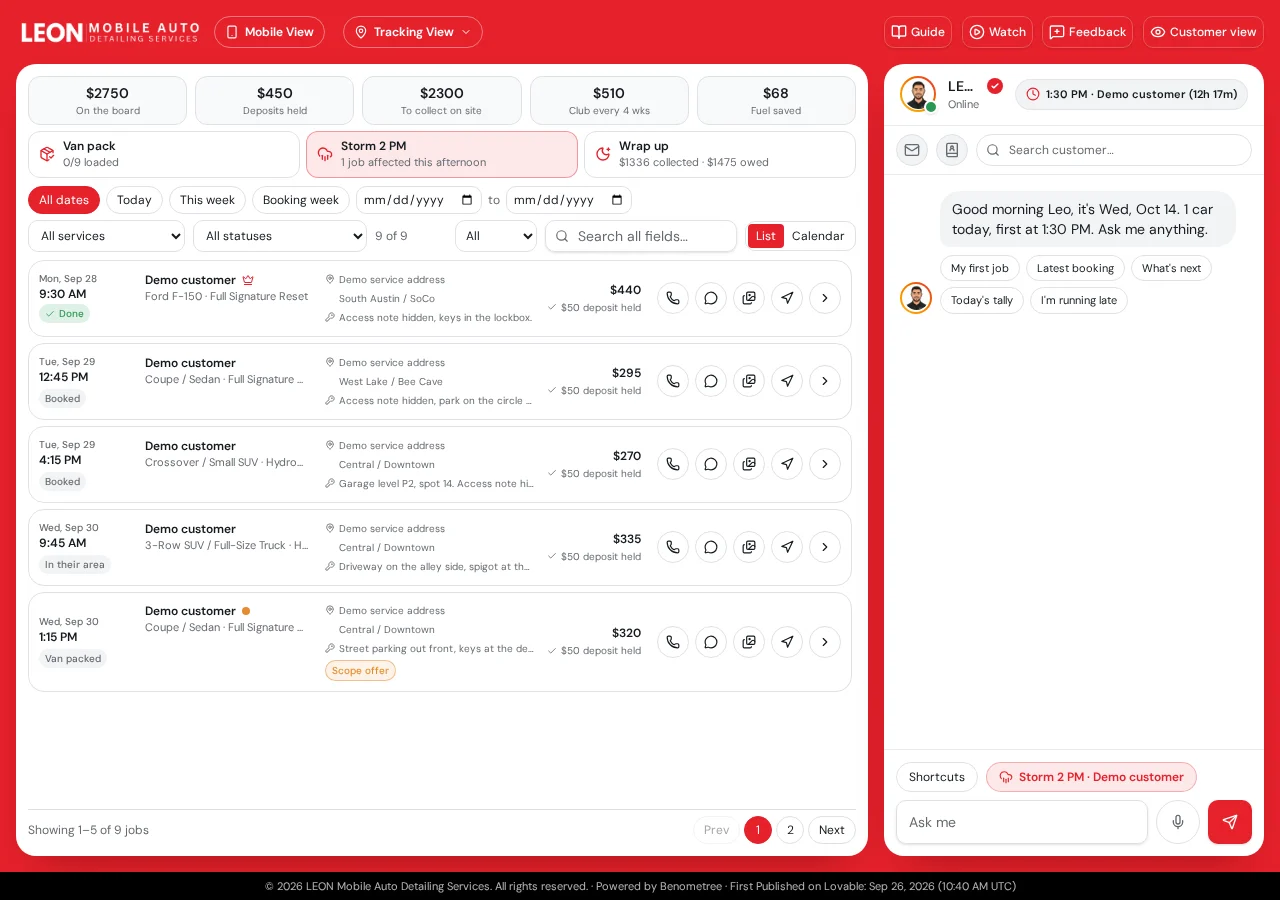
The Business View is organized around jobs that need to be carried out. Each row shows the appointment date and time, vehicle, service, zone, access note, current status, total, and deposit. This is the business counterpart to the customer’s visit summary: the selected service becomes something the operator can prepare for and deliver.
Date shortcuts, a date range, service and status selectors, and search by name, vehicle, phone, or address help locate a request without scrolling through every booking. Pagination keeps the board manageable. The visible summary separates work on the board, deposits held, amounts to collect on site, recurring-club value, and a fuel-saved indicator. These are demonstration figures, not verified revenue or route-efficiency results.
The assistant opens with the day’s first appointment and shortcuts for My first job, Latest booking, What’s next, Today’s tally, and I’m running late. A conversational entry point sits beside the structured board rather than replacing it. The operator can inspect the record directly while using the assistant for common questions. This supports a solo-service workflow without claiming that the chat can safely perform every business task unattended.
Feature 02
Compare committed work with open appointment windows
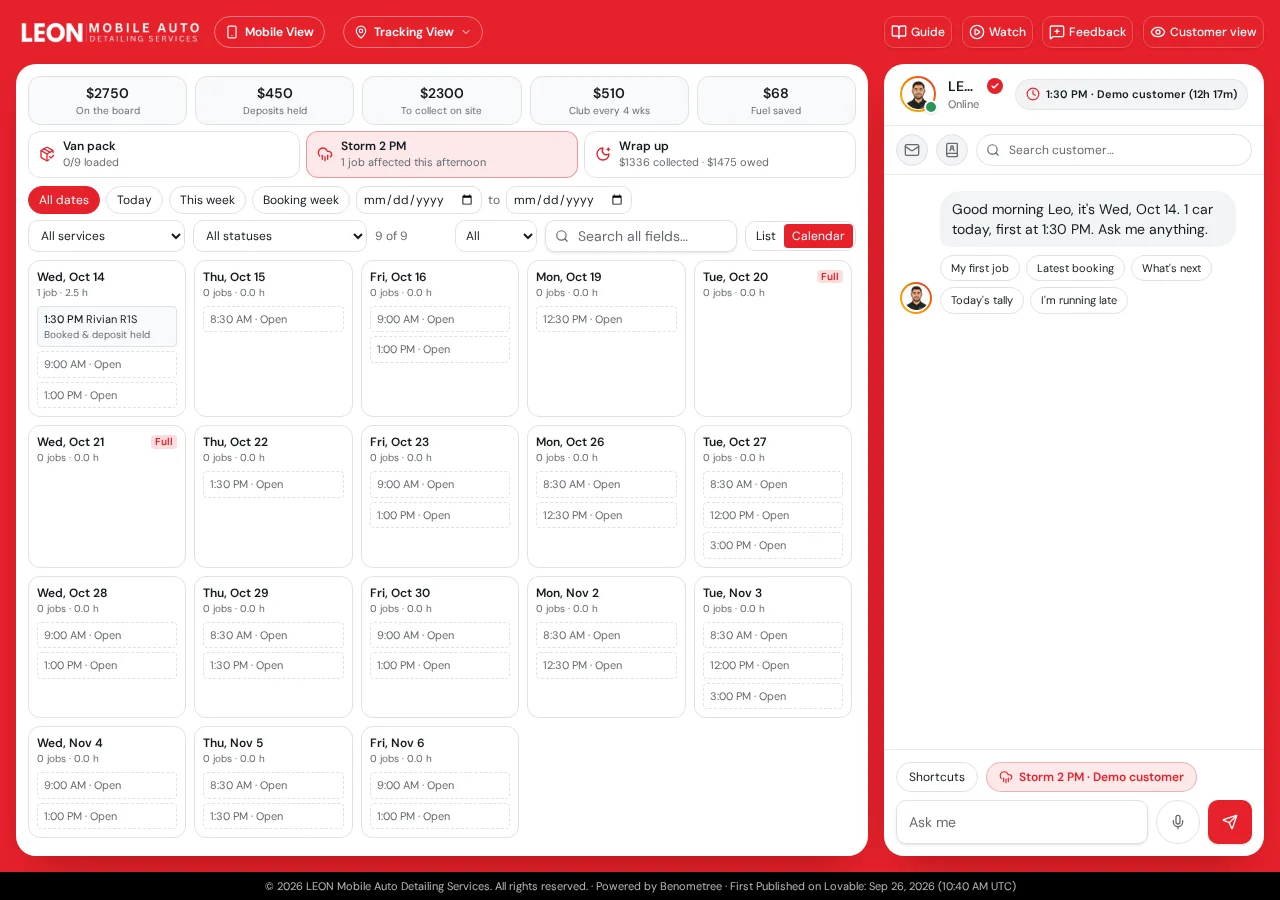
The calendar provides a different view of the same operational question: when is the van already committed, and where are openings shown? Day cells display job counts, estimated hours, scheduled vehicles, and open windows. The list is useful for finding and acting on a specific job; the calendar makes the shape of the working week easier to scan.
This helps explain why a mobile booking system needs more than a date picker. Service duration and travel context affect whether a day is practical. LEON’s zones and windows illustrate that relationship. The screen does not prove an optimization algorithm, and labels such as Full should be reviewed against actual availability rules before relying on them in production.
Feature 03
Translate booked services into van preparation
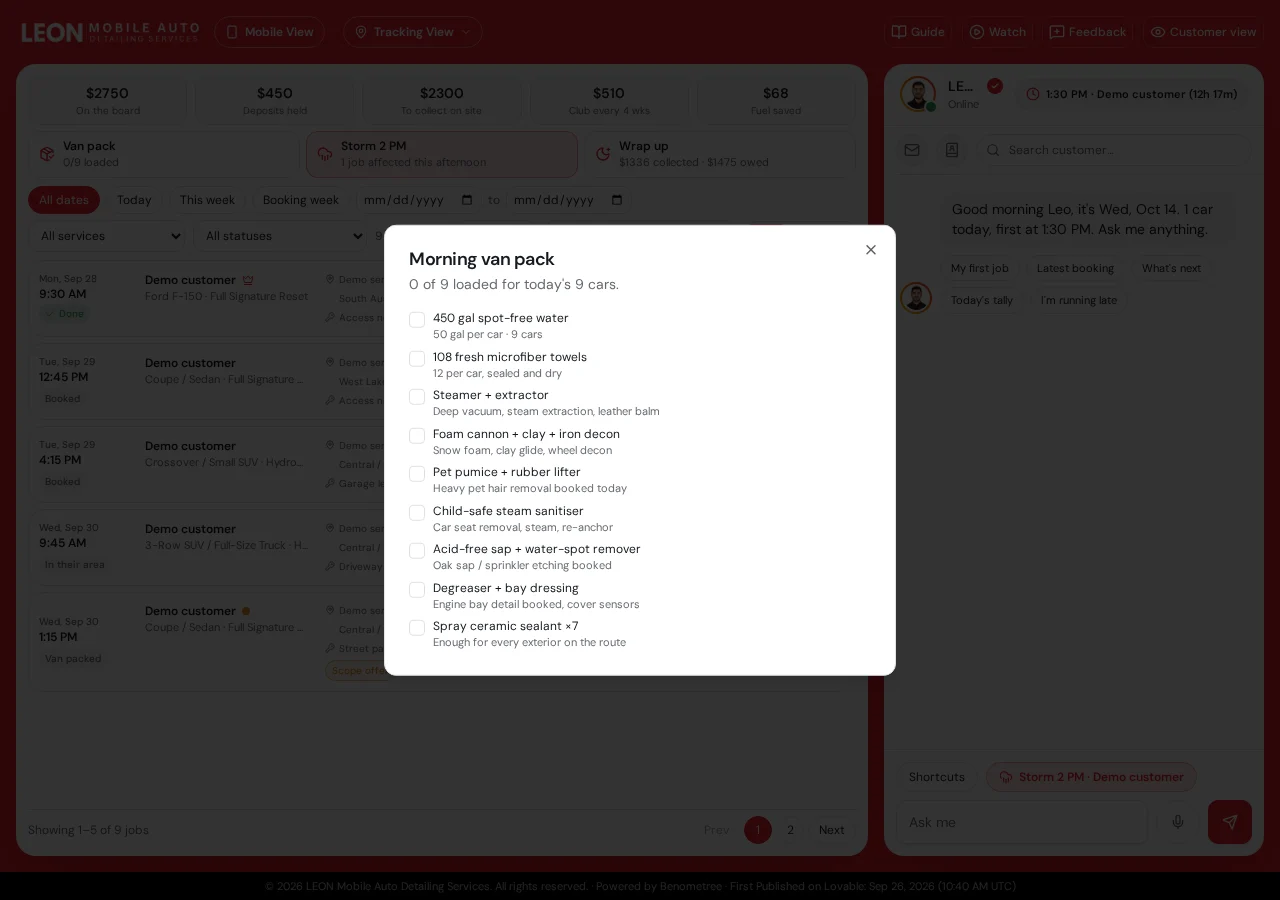
The van-pack checklist makes preparation part of the booking workflow. It lists water and microfiber towels, steamer and extractor equipment, exterior-care tools, and supplies for pet hair, child seats, water spots, engine bays, and ceramic finishing. The descriptions connect several items to the kinds of work on the board rather than offering an unrelated generic checklist.
A loaded-item count gives the operator a visible preparation state. The practical benefit is straightforward: a customer’s add-on choice should influence what goes into the van. Collecting that information during booking is useful only if it reaches the person doing the work. Quantities in this screenshot are fictional demo values, not an endorsed stocking calculation or an independently verified inventory system.
Feature 04
Keep the job context beside the next action
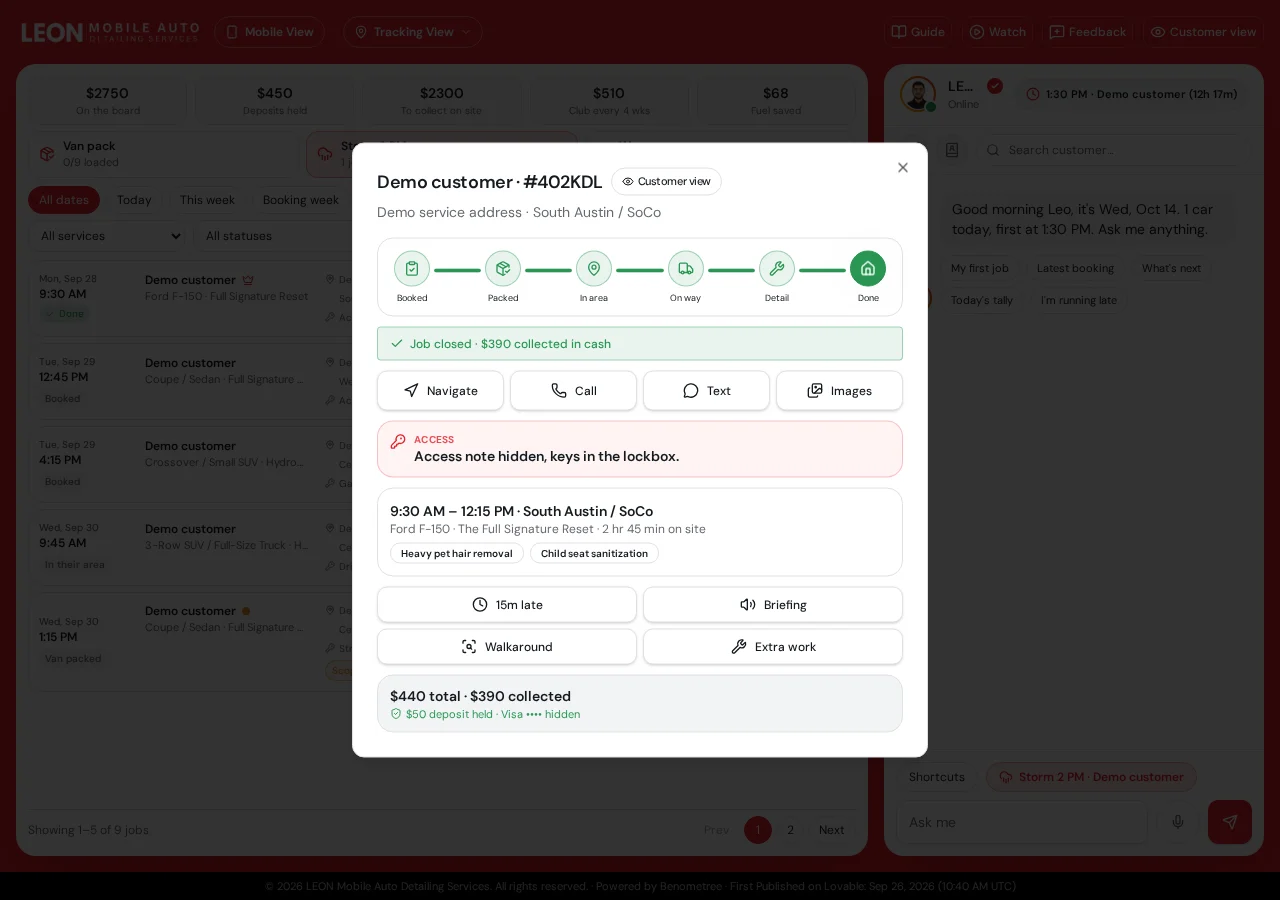
The job card brings the visit window, vehicle, package, add-ons, access instructions, deposit, and total into one focused panel. Its progress labels—Booked, Packed, In area, On way, Detail, and Done—correspond to the stages the customer sees in more descriptive language. This shared vocabulary is central to a connected service experience.
Navigate, Call, Text, and Images sit close to the job details, alongside a 15m late control, Briefing, Walkaround, and Extra work. The operator should not have to copy an address out of a message thread before finding the next stop or checking how to enter the property. The demo exposes these controls; real calls, navigation, and outbound messages were not triggered in this review.
The Text panel includes customer conversation history, ready-made arrival and hand-off messages, tone choices, and Draft with AI. Voice input is also available in the business assistant. These tools illustrate support for an operator whose hands and attention are often occupied. Drafted content still needs review, and visible AI or voice controls do not establish the reliability of an external model or transcription service.
Feature 05
Record the starting condition before work begins
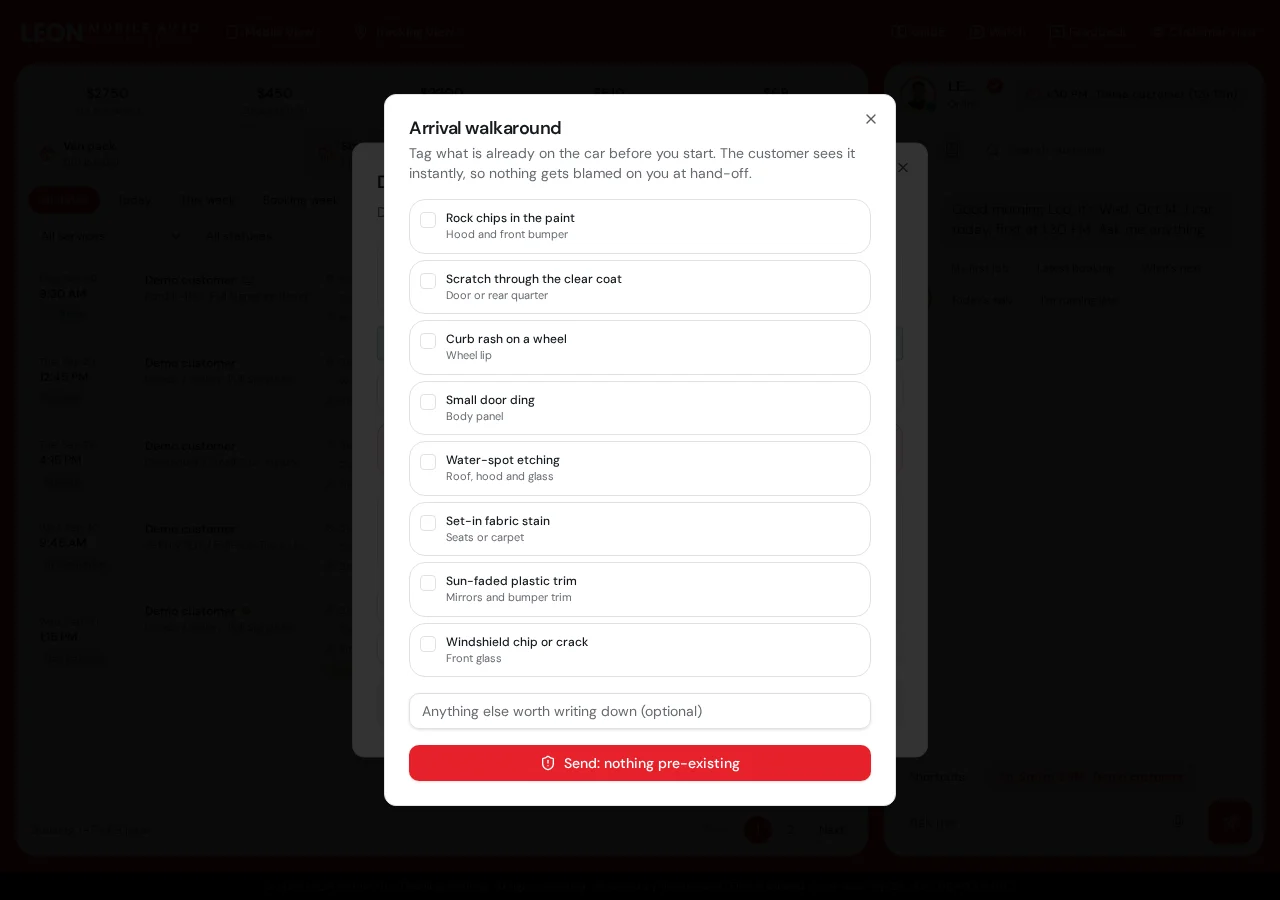
The arrival walkaround provides structured tags for rock chips, scratches, curb rash, door dings, water-spot etching, fabric stains, faded trim, and windshield damage. An optional note covers conditions outside the predefined list. The panel explains that the customer can see the record, linking the operator’s inspection to the hand-off conversation.
A pre-service condition record is intended to reduce ambiguity about what was already present when the van arrived. It also gives the operator a repeatable inspection prompt rather than relying on memory. The review inspected this panel without sending a condition report; synchronization, record retention, and any legal protection must be validated separately before a real business relies on them.
Feature 06
Make extra scope an explicit customer decision
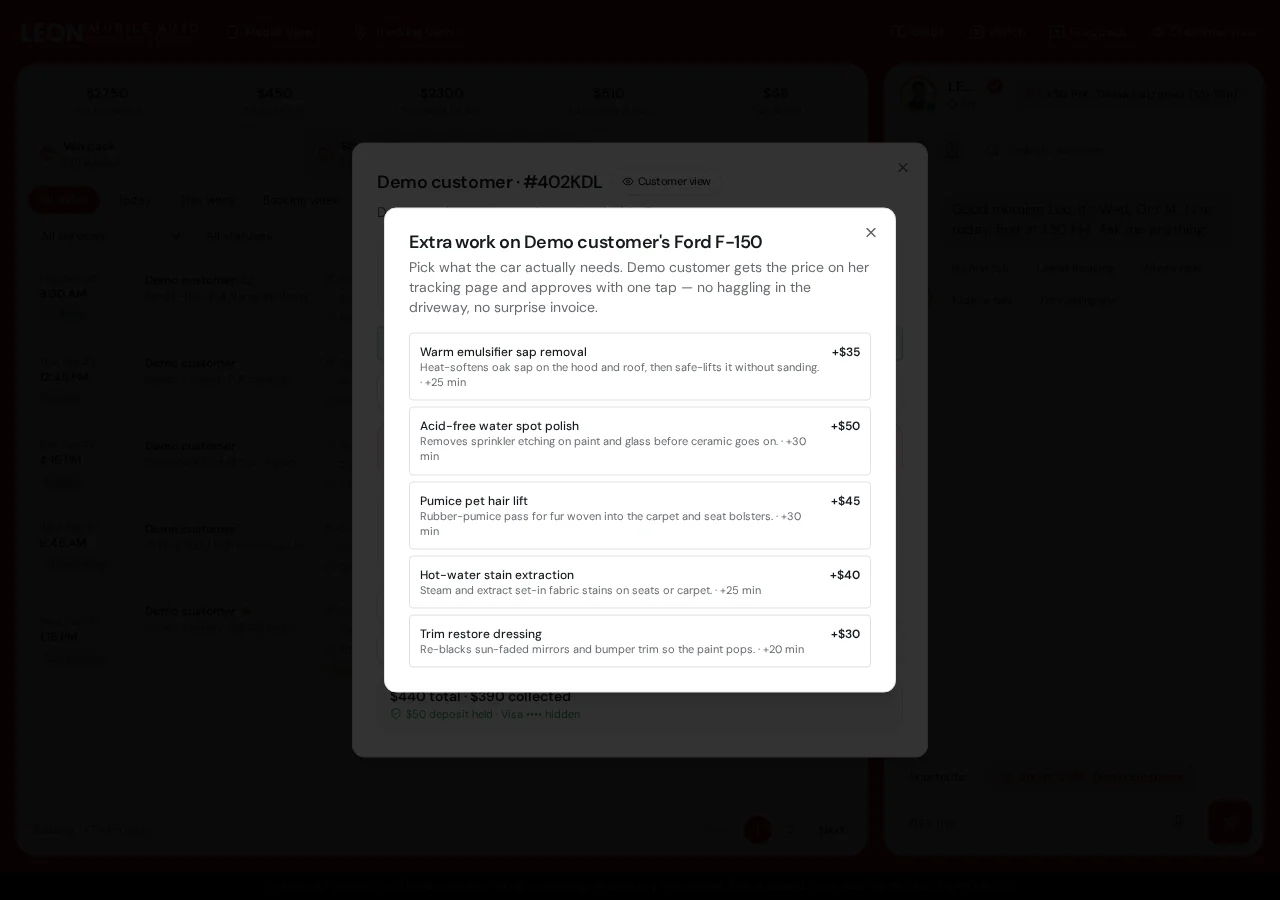
A car can need work that the original photos or booking answers did not reveal. The Extra work panel lists sap removal, water-spot polishing, pet-hair lifting, stain extraction, and trim restoration with a description, additional price, and extra time. Its copy explains an approval step on the customer’s tracking page instead of silently increasing the invoice.
This connects service scope to both cost and schedule. A useful change request should tell the customer what will be done, why it is additional, and what it changes before approval. The observed panel demonstrates that decision structure. No offer was submitted or approved during the review, so the article does not claim a verified payment adjustment or completed approval transaction.
Feature 07
Handle weather as an operational exception
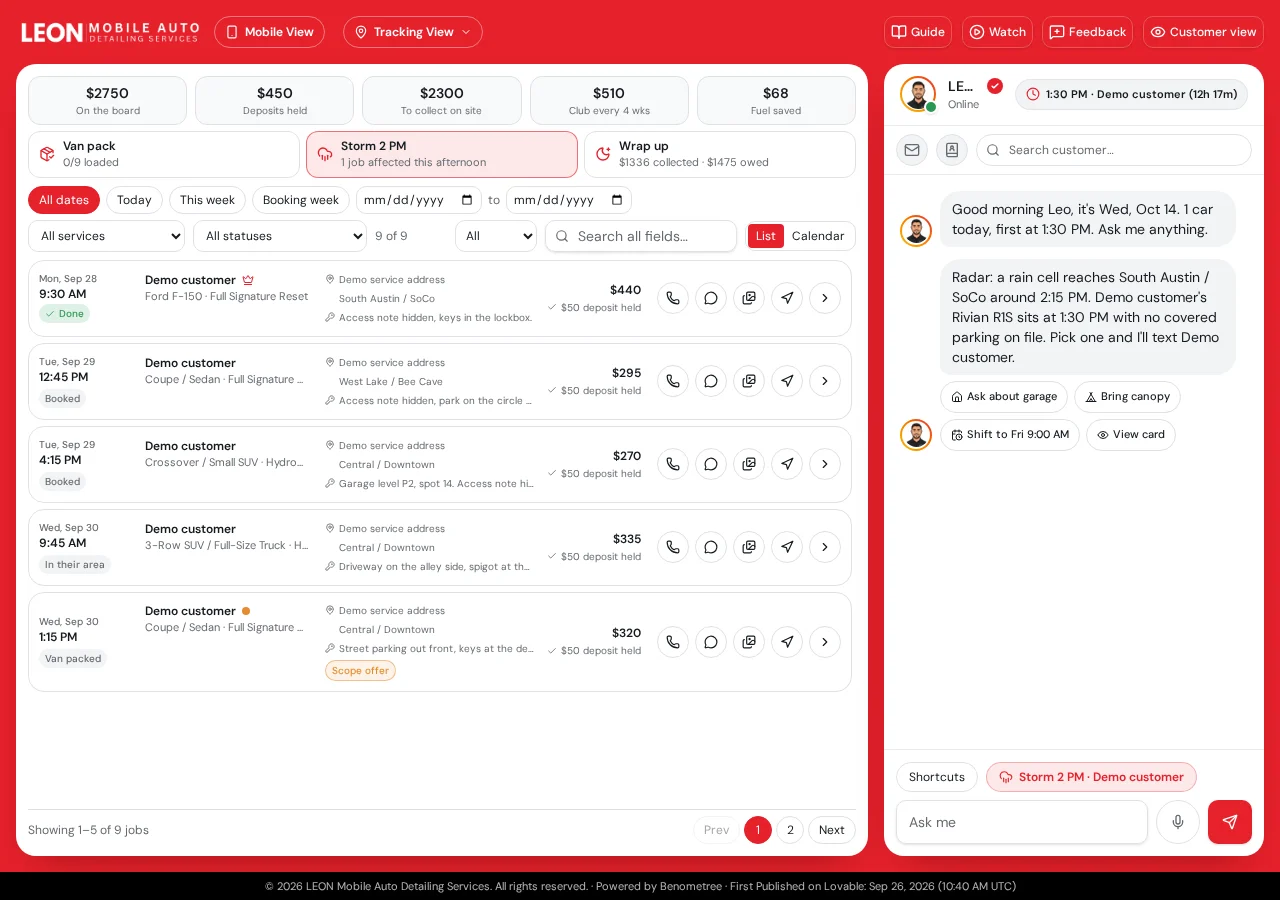
Storm triage turns an exception into a specific decision. The demo assistant describes a rain cell, an affected service zone, the appointment time, and the absence of covered parking in the sample record. It offers Ask about garage, Bring canopy, Shift to another window, and View card rather than leaving the operator with a weather warning alone.
The feature illustrates the connection between environment, location, service context, and customer communication. For a mobile business, changing conditions should not require rebuilding the booking from scratch. These options were opened but not submitted. The radar wording is part of the demonstration and does not prove a live weather integration, automatic customer texting, or a guaranteed rescheduling outcome.
Feature 08
Close the day with settlement and tomorrow’s readiness
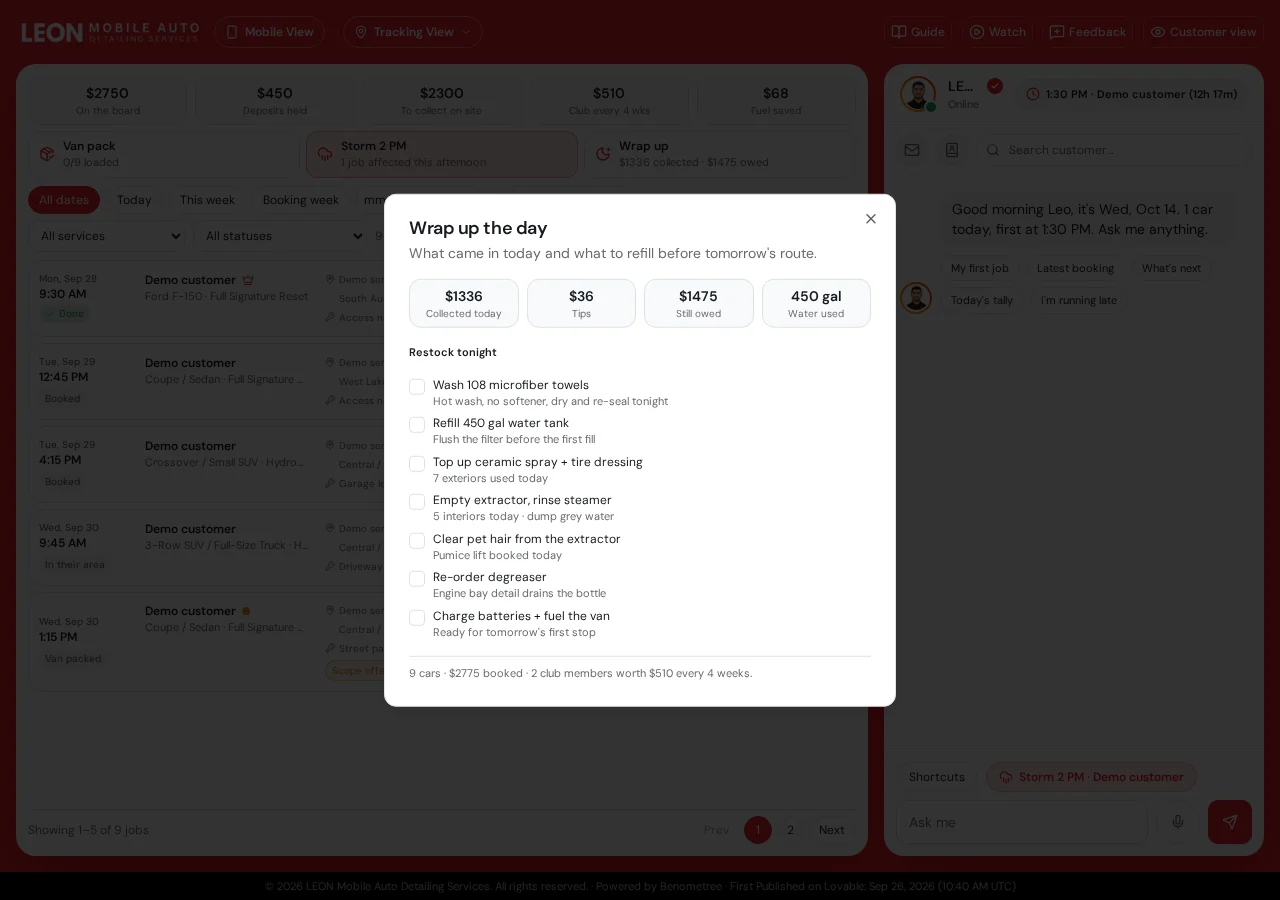
The end-of-day panel shows collected amounts, tips, money still owed, and water used. It then turns attention to washing towels, refilling the tank, topping up finishing products, cleaning equipment, replenishing supplies, and charging batteries or fueling the van. The booking system therefore follows the service cycle beyond the customer’s confirmation screen.
The panel also summarizes booked work and recurring-club value. This can help a solo operator distinguish today’s settlement from future service commitments while preparing for tomorrow. It remains a fictional snapshot, not an accounting reconciliation or proof of fuel savings. The strongest lesson is the workflow connection: booking choices influence preparation, job delivery, customer updates, settlement, and the next working day.
05 · A connected journey
Solve the handoffs around the booking.
The problem is not simply collecting an appointment. It is carrying the right information through the service. Vehicle and package choices describe the work. The location and access notes describe where it happens. The window describes when. The operator needs that context to prepare, and the customer needs understandable updates as the visit progresses.
LEON makes those connections visible across its three views. Booking choices become service details on the job card. Requested work informs the illustrated van-pack checklist. Operator stages have customer-facing equivalents on the tracker. Condition notes and extra-work proposals give scope changes a place in the conversation. The completed view brings photos, a hand-off checklist, and an itemized receipt back to the customer.
The result is a coherent demonstration of an end-to-end service workflow rather than a standalone form. Its value lies in making decisions and handoffs explicit: less information to repeat, clearer preparation, more understandable progress, and fewer unexplained changes. Those are intended design benefits, not measured improvements. Production use would still require protected customer records, tested availability and payment handling, reliable notifications, and validated external integrations.
06 · Design decisions
Why shape a custom booking experience with Lovable?
A custom booking experience makes sense when the service requires decisions that a generic appointment page does not express well. Here, vehicle type, scope, optional conditions, and geography all influence what the customer is asking for. Lovable provides a way to develop and refine that experience around the business process.
The important work is defining the journey, not just generating screens. A conversational interface still needs understandable choices, correct totals, sensible access boundaries, and dependable handling of errors. Review should include backtracking, incomplete details, unavailable slots, and repeat submissions—not only the happy path pictured in a case study.
An off-the-shelf scheduling tool may be sufficient for a simpler service. The decision should follow the workflow and support requirements rather than a preference for custom software. Benometree’s Custom Web Apps service starts with those users and decisions, then defines the smallest useful scope.
07 · Common questions
What can another service business learn?
Is this a website or a booking app?
The captured experience combines both: public information explains the service, while the interactive desk collects a structured request. The value comes from connecting those roles rather than treating them as unrelated pages.
Can this approach work beyond mobile detailing?
The design pattern can inform other appointment-based services. The actual questions, scheduling rules, coverage, pricing, and customer-data requirements must be defined for each business; the LEON journey should not be copied without that work.
What does the Tracking View add beyond booking confirmation?
It brings arrival expectations, progress stages, service details, preparation guidance, reschedule choices, and booking-aware help together. The completed demo adds hand-off photos, a service checklist, and an itemized receipt.
What does the Business View help the operator manage?
The public demo shows job search and filters, calendar availability, van preparation, focused job cards, condition logging, extra-work proposals, weather options, customer communication tools, and end-of-day restocking and settlement summaries.
Is the demo proof of live GPS, payments, or automated messaging?
No. This review documents public screens and read-only panels in a fictional demonstration. External delivery, live GPS, payment processing, and end-to-end updates require separate verification.
Does this case study prove increased bookings?
No. The screenshots document interface choices and the article explains intended benefits. Conversion improvements, time savings, and other performance claims require measured evidence, which is not presented here.
What should be checked before launching a similar system?
Test the complete request and confirmation flow, payment behavior if used, availability, access to private records, customer notifications, mobile use, and recovery from failed actions. Establish who maintains the service rules after launch.