01 · Why I joined
A real brief, a deadline, and a public scoreboard.
I build websites and web apps with Lovable for a living, so a Lovable challenge might sound like more of the same. It was not. Client work comes with a client: someone who already knows their business, answers questions, and tells you when something is wrong. A challenge removes that safety net. You have to invent the business, define the problem, judge your own work, and then put it in front of other builders and a panel of judges who see dozens of entries.
When Lovable and Contra announced the “Built it for small business” challenge, with a $25K cash prize pool, the brief caught my attention immediately because it described work I care about: helping a small business turn a customer’s question into a confirmed appointment. That is exactly the kind of practical problem I want to solve for my own clients in the Philippines and abroad. If you are new to the platform, my guide What is Lovable? explains it in plain language.
I did not win. I want to say that plainly at the start, because this article is not a victory lap. It is an honest account of what I built, how I built it, what the winning entries showed me, and how the experience changed the way I approach Lovable projects. Losing a challenge with a clear brief and clear criteria turned out to be one of the most useful learning experiences I have had as a builder.
If you are thinking about joining a future Lovable challenge, or you are a business owner wondering what goes into a custom booking experience, I hope this gives you a realistic picture: the excitement, the long build days, the decisions that worked, and the ones I would make differently next time.
02 · The challenge brief
From “can I book with you?” to “you’re booked.”
The theme asked every participant to pick an appointment-based business archetype — a salon, a dentist, a contractor, a tutor, a photographer, or anything similar — and rebuild the moment a customer inquiry turns into a confirmed booking. The goal was to make that journey happen with as little effort from the owner as possible.
The guidelines offered two ways to approach it. The first was to fix the front door: make it effortless for a customer to check availability, request a time, and get confirmed with no back-and-forth. The second was to fix the follow-through: cut the manual busywork on the owner’s side, such as reminders, confirmations, rescheduling, and lead follow-up.
There was one rule I found especially helpful. Each business needed a name, a location, and a believable set of quirks — busy hours, a no-show problem, a solo owner juggling everything. The brief asked us to treat it like a real client brief, not a generic template, and stressed that the outcome should genuinely reduce a hypothetical owner’s manual effort, not just look good.
Every submission needed a believable business archetype with those details, a build made in Lovable with a public project link, the business name with a one-line description of the problem solved, a demo video under three minutes, and a social post tagging Lovable with #lovablechallenge. A short video of your process earned bonus points.
Entries were judged on four criteria: problem-solving impact (does it genuinely turn an inbound inquiry into a confirmed booking?), owner-effort reduction (how much manual work would it remove?), craft and execution (is it polished, functional, and complete end-to-end?), and storytelling (how clearly do the before/after and walkthrough communicate the value?). Those four criteria became the lens I used to reflect on my entry after the results were announced.
03 · Choosing the business
Why I picked a mobile detailing business.
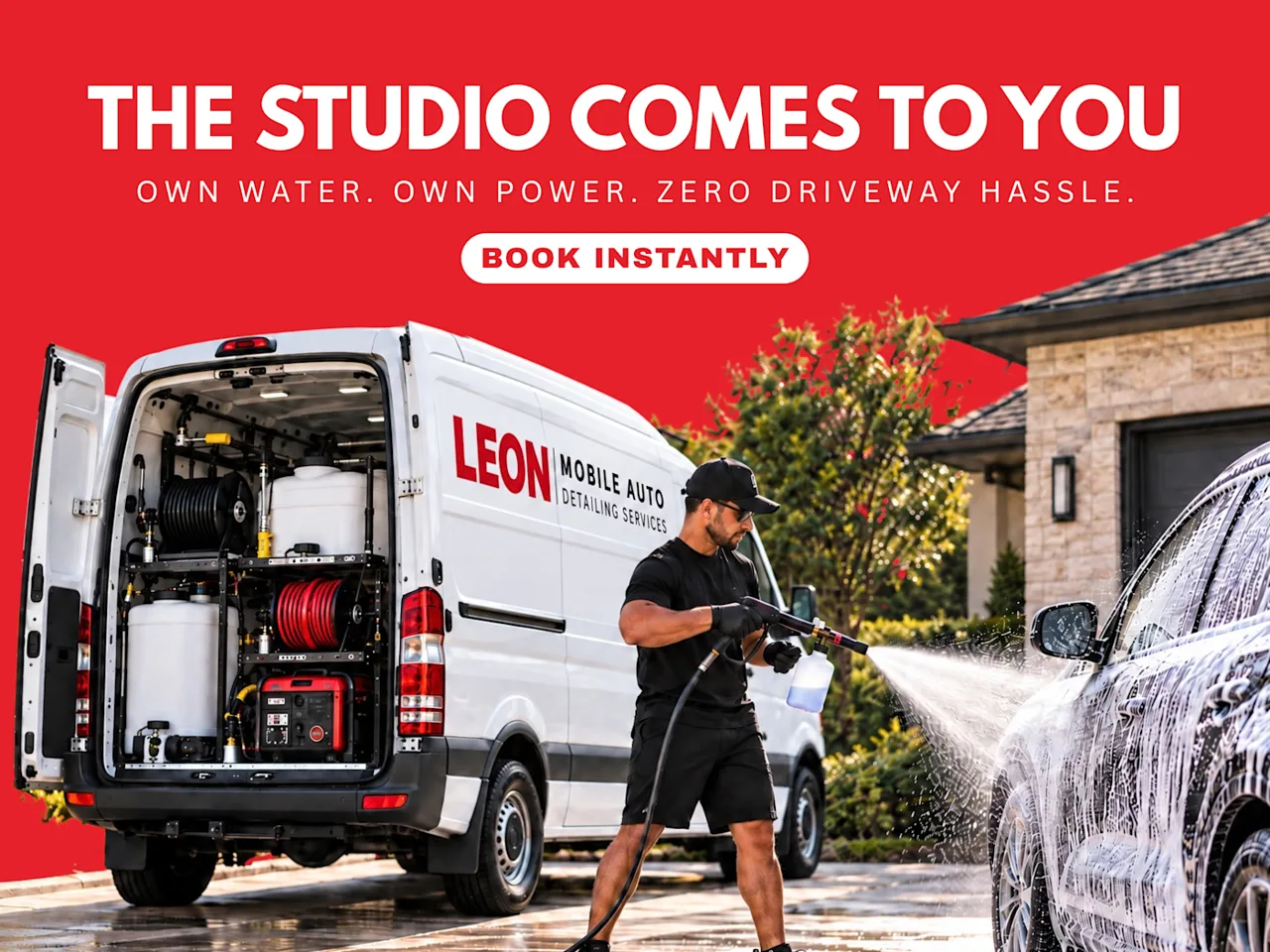
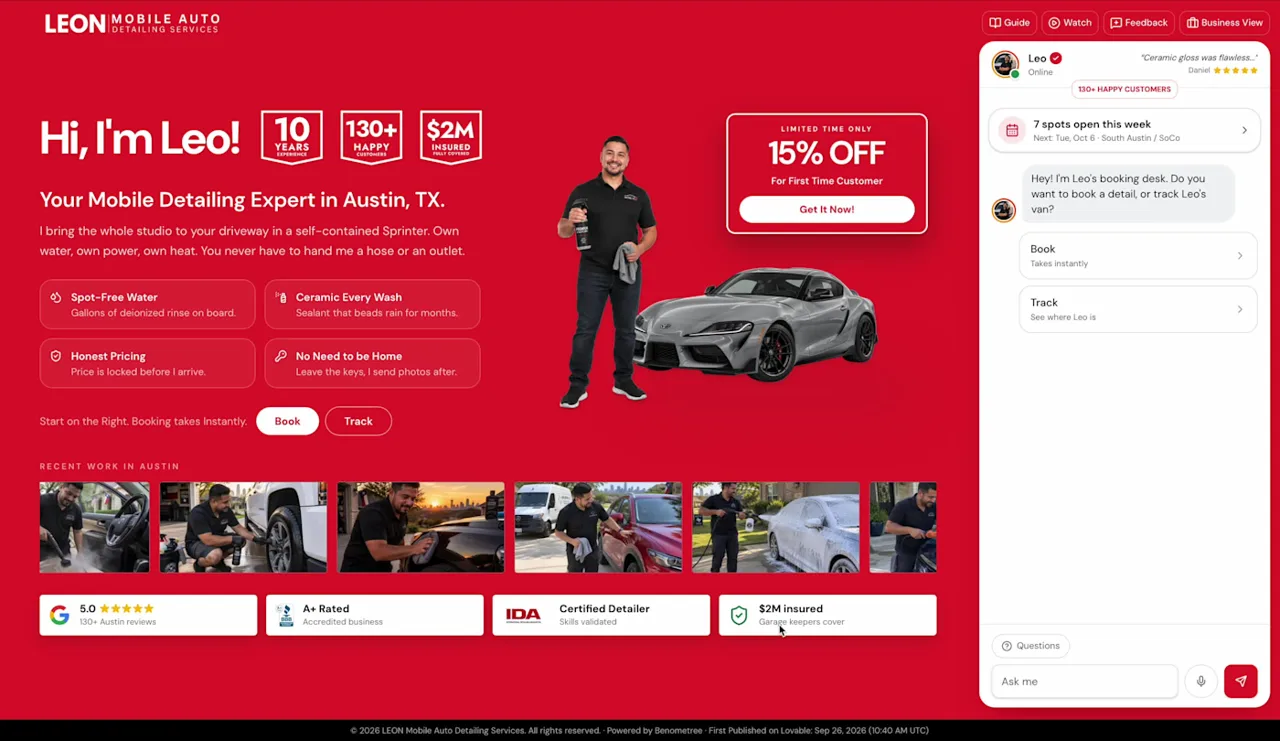
I chose a mobile car detailing service and called it LEON Mobile Detailing. LEON is fictional; it exists only as my challenge entry. I picked mobile detailing because it is harder than a typical salon booking. The business does not wait for customers to arrive. The operator travels to them, so every booking depends on more than a date and a time.
A useful booking for a mobile detailer has to answer several questions at once: what vehicle needs work, which package fits it, whether the address is inside the service area, whether add-ons change the duration, and which arrival window is realistic given travel between jobs. Weather matters too, because rain can cancel exterior work. And like many small service businesses, LEON is effectively a solo operator who is busy doing the work while customers are trying to reach them.
Those quirks gave me a clear problem statement: help a solo mobile detailer turn “can you come detail my car?” into a confirmed, prepared visit without endless messages about price, location, timing, and weather. I liked that this touched both approaches in the brief. The customer side was the front door. The operator side was the follow-through.
In hindsight, choosing a business with this many moving parts was both my biggest strength and my biggest risk. It let me show more interesting problem-solving, but it also meant there was much more to build, test, and explain in under three minutes.
04 · My process
How the build came together, step by step.
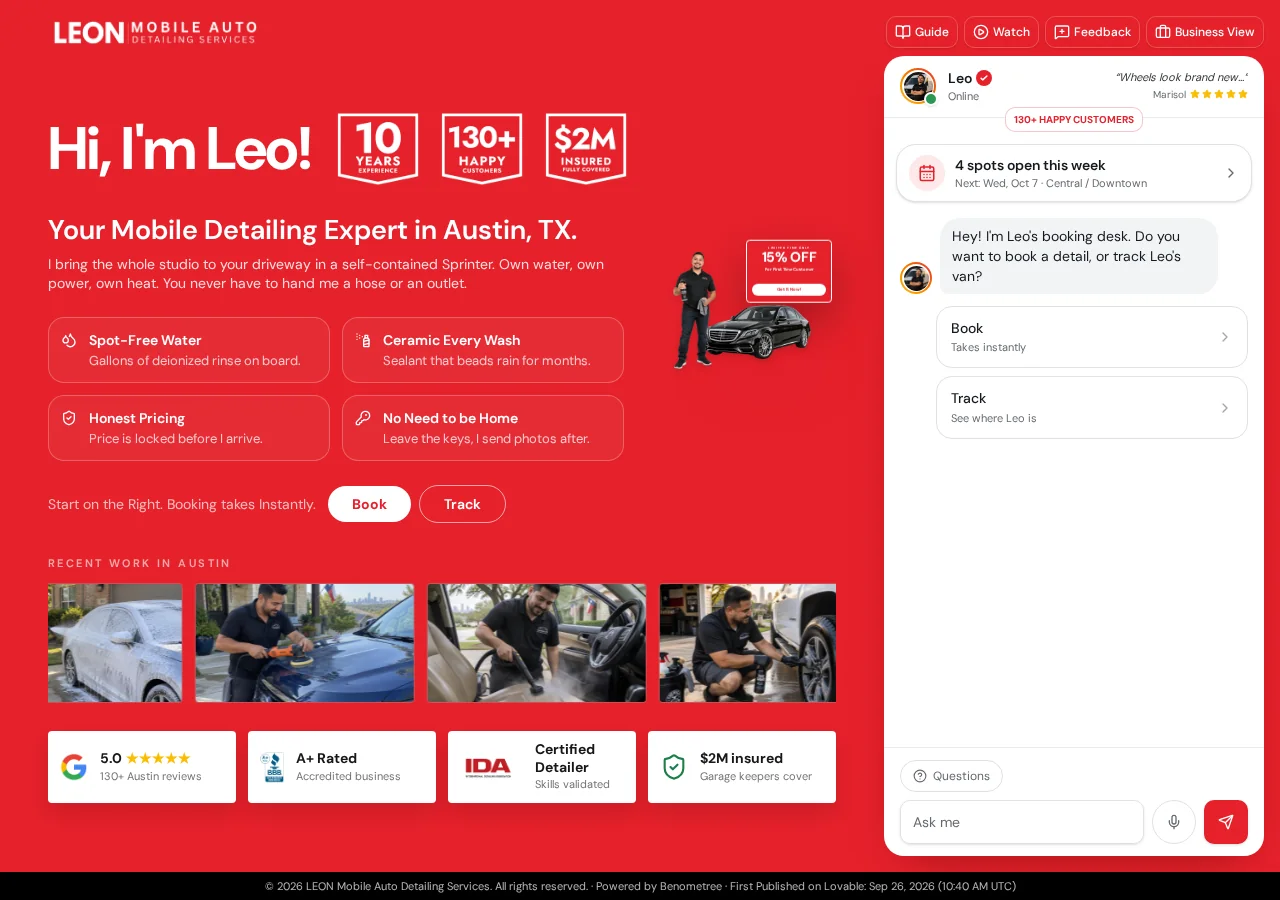
I started with the customer’s questions rather than the screens. Before writing a single prompt, I listed what a car owner would want to know before committing: How much will this cost for my car? Do you come to my area? How long will it take? When can you arrive? What happens next? Every major screen in the customer view answers one of those questions.
The first working piece was the booking desk. Instead of a long form, I designed it as a guided sequence: choose the vehicle, confirm the service area, select a package, add extras, pick an arrival window, enter booking details, and review the deposit request. Each step builds on the previous one, so the total and the expected duration stay visible as the customer goes. Lovable made it quick to try a step, look at it, and reshape it until it felt like a conversation instead of paperwork.
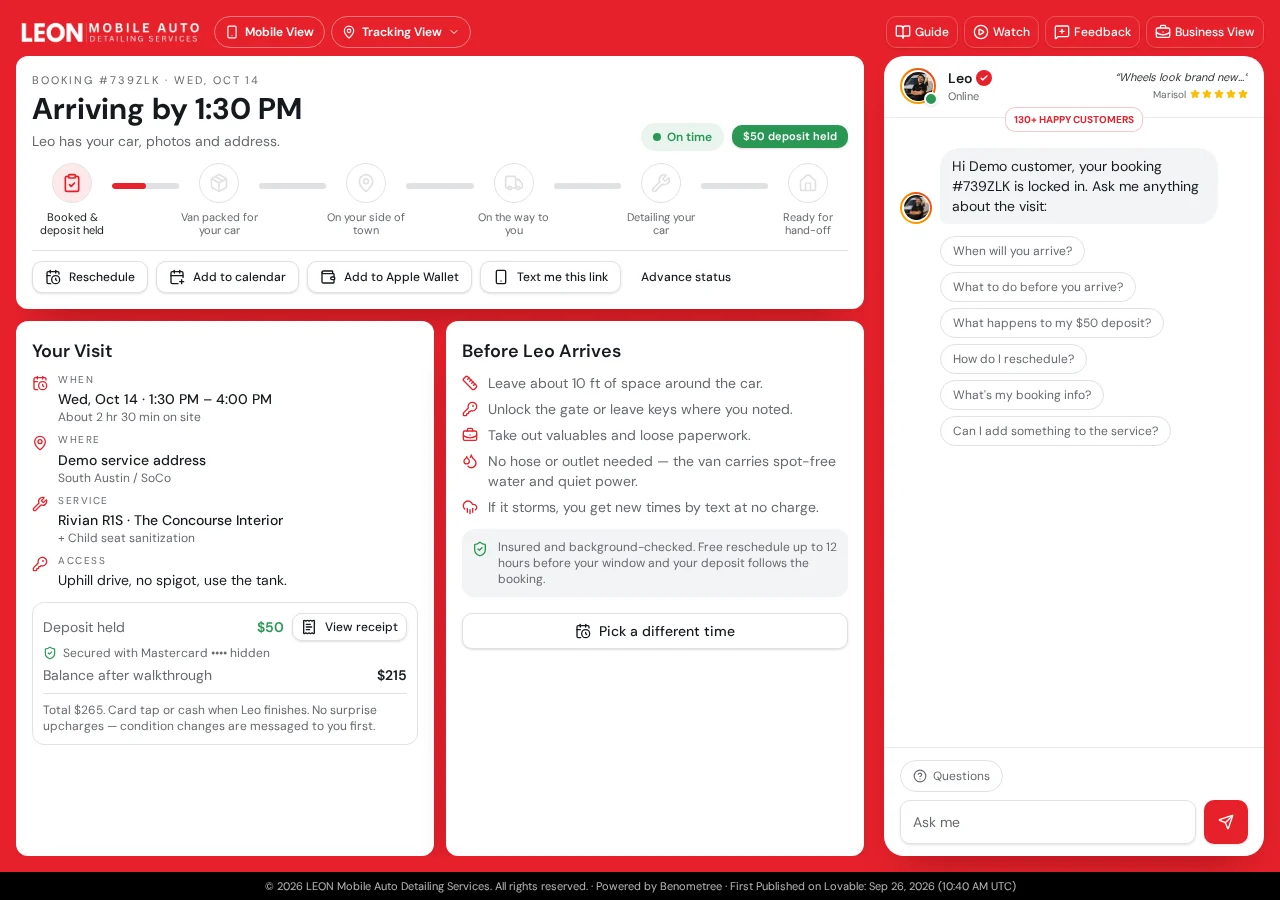
Next came the tracking view. A booking confirmation is only the beginning for a mobile service; the customer then wonders when the detailer is coming and what is happening to their car. I built a booking-code lookup that opens a tracker with arrival expectations, job stages, preparation guidance, reschedule options, and help that knows which booking you are asking about. I also built a completed-visit version with hand-off photos, a service checklist, and an itemized receipt.
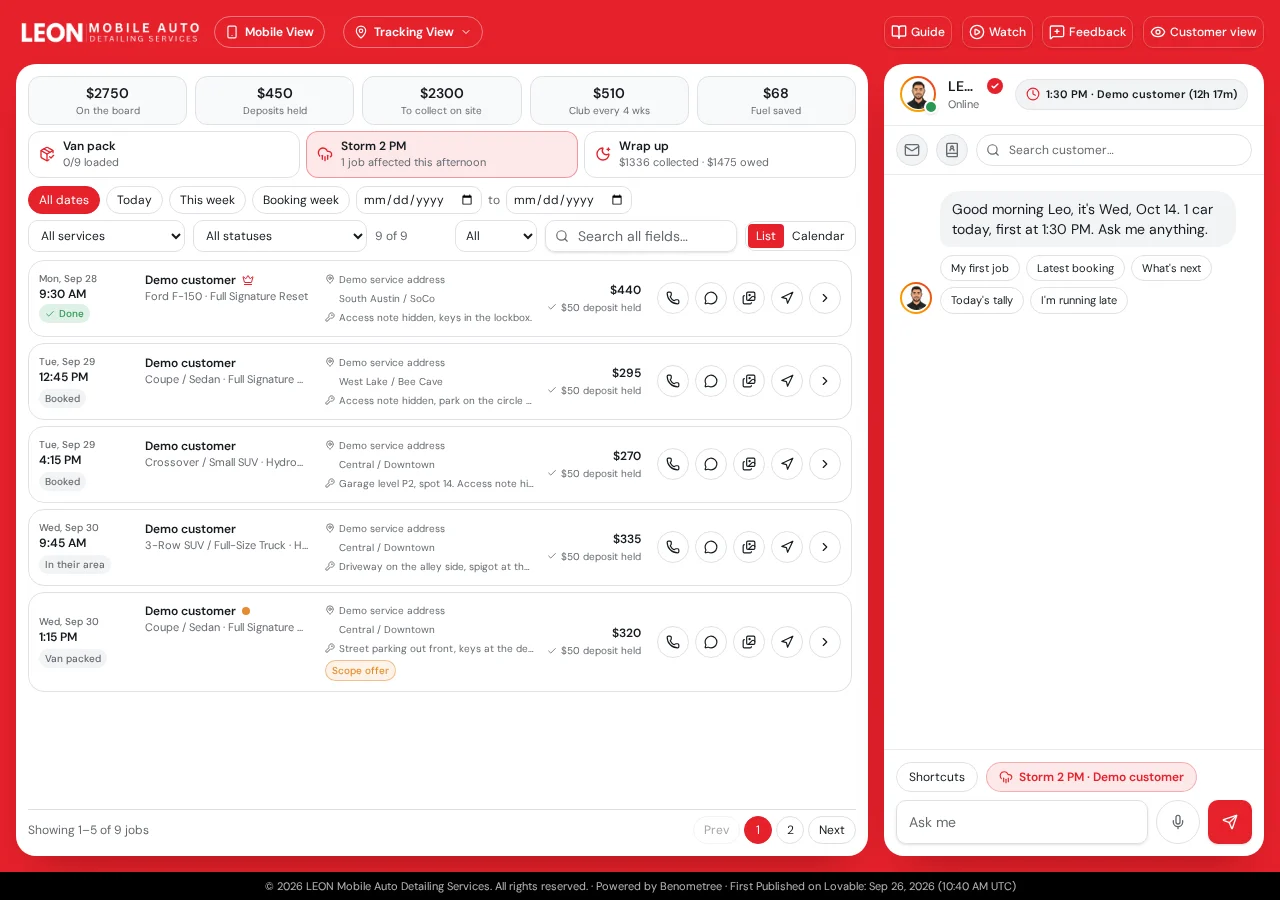
Then I turned to the business view, which was the part I was most excited about because it addressed the follow-through half of the brief. The operator gets a job board with search and filters, a calendar, a van-pack checklist based on the booked services, focused job cards, condition logging, extra-work proposals, weather options, customer communication tools, and an end-of-day summary for restocking and settlement.
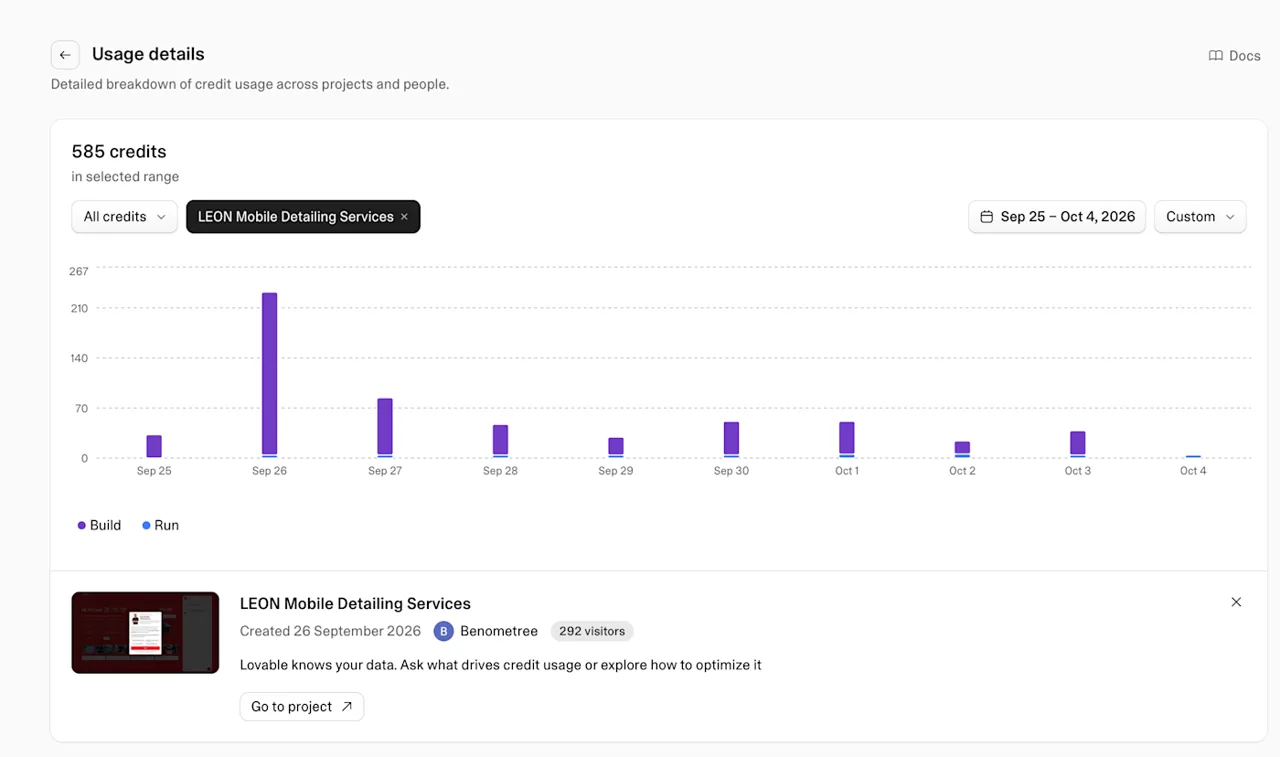
September 26 was the most intense day of the build. I shared on Contra that it was the hardest day of the project: the moment when the three views had to start feeling like one connected system rather than three separate demos. Making booking choices appear correctly on the job card, keeping the operator’s stages in sync with what the customer saw, and checking that the totals stayed consistent took far longer than building any single screen. My Lovable usage chart tells the same story: the LEON project used 585 credits between September 25 and October 4, and by far the biggest share went into that single day.
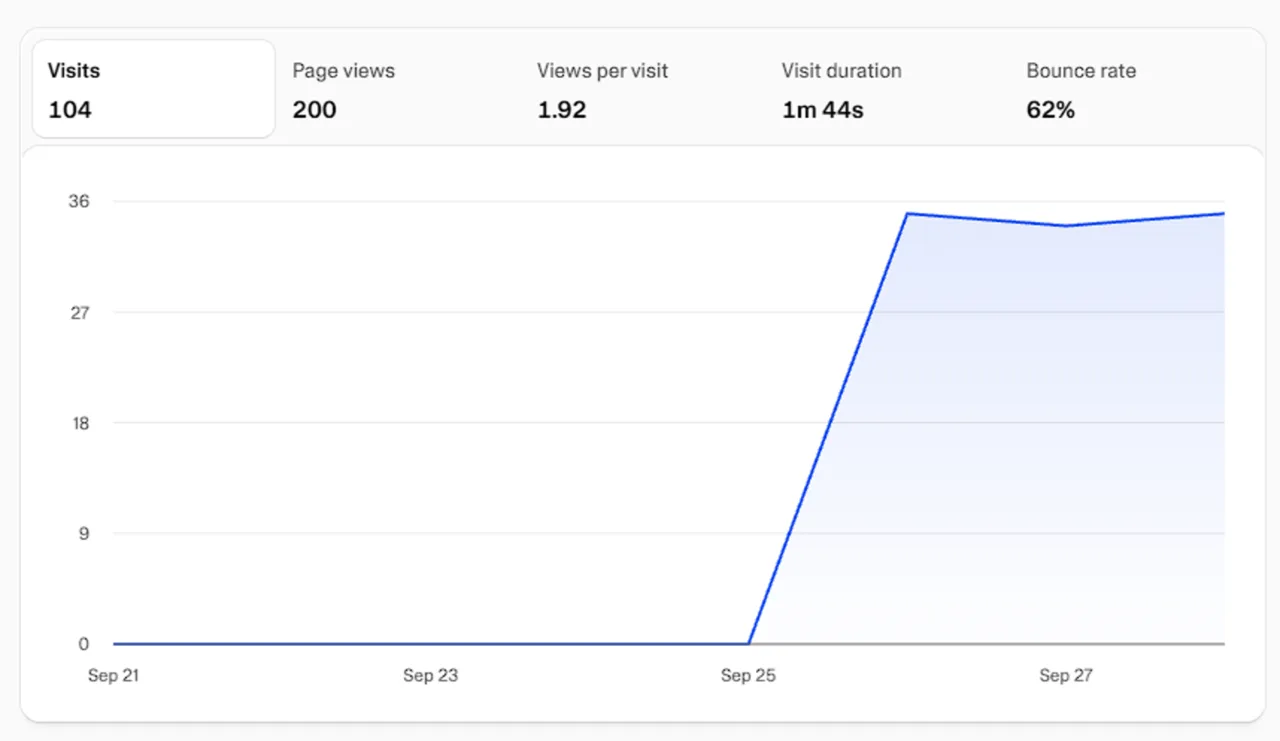
The demo went public the same day, and I kept sharing progress. Two days later I posted that it had passed its first 100 visits — 104 visits and 200 page views from people curious about the booking system. That was a visit count, not bookings or business results, but it was the first sign that other builders and visitors found the idea worth exploring. Throughout the challenge I posted the process on my Contra profile, from the build day to booking and tracking walkthroughs.
Close to the finish I added something small that I am still proud of: a mobile view button for the demo. Judges and visitors would mostly open the project on a laptop, but real customers of a mobile detailer would book on their phones. The button lets anyone preview the phone experience without resizing their browser. I shared it on Contra on October 8 because it made the demo far easier to evaluate honestly.
Finally, I recorded the walkthrough video and wrote the submission. This is where I learned that finishing the build and finishing the entry are two different jobs. Fitting a three-view system into under three minutes forced me to choose what to show, and I suspect I tried to show too much.
05 · Building in Lovable
What the build taught me about working with Lovable.
Lovable is fast at turning an idea into something you can click. That speed is a gift in a challenge, but it is also a trap. It is very easy to keep adding screens because each one appears so quickly. The discipline is in deciding what the experience should do before asking for it, and then checking that each new piece actually connects to the rest.
I got the best results when my prompts described the situation and the rule, not just the look. “Add a weather screen” produces a decorative panel. “When rain is forecast for an exterior job, give the operator options to move the visit or switch to interior-only work, and show the customer the same choice” produces something with a purpose. The more I wrote like a business owner explaining a policy, the better the result.
Iteration was constant. I would build a step, test it as a customer, notice a confusing label or a total that did not update, and fix it. Some of the most valuable changes were tiny: making the selected package obvious, keeping the running total in view, labeling arrival windows instead of exact times so a mobile operator is not promising the impossible, and giving every screen a clear next action.
Things also broke. Connecting data across views exposed mismatches — a detail captured during booking that did not appear where the operator needed it, or a stage name on the business side that did not match the customer tracker. Fixing those taught me to keep a simple list of the information that travels through the whole journey and to check it at every handoff.
Above all, I tried to keep LEON believable rather than decorative. The brief warned against entries that only look good. That pushed me to ask, for every feature, “would a solo detailer actually use this on a busy day?” If the answer was unclear, the feature either got simpler or got cut.
06 · The winners
Watching the winners announcement.
Contra announced the results in a video called “Lovable Challenge: Winners Announcement” on its YouTube channel. Watching it was humbling in the best way. I am not going to describe the winning projects in detail here, because I would rather you watch the announcement and see them presented by the people who judged them. What I can share is the pattern I noticed and how it compares with my own entry.
The strongest entries made the value obvious almost instantly. You understood the business, the problem, and the before-and-after within seconds. That is the storytelling criterion in action, and it reminded me that judges, like customers, decide quickly whether something is worth their attention.
They also stayed focused. A clear problem, solved completely, beats a broad system that is impressive but harder to grasp. Owner-effort reduction was easy to see because the entries showed specific manual tasks disappearing, rather than leaving the viewer to imagine the benefit.
And they felt finished. Craft and execution meant the main path worked end-to-end with no obvious gaps, and the presentation matched the quality of the build. Seeing that standard helped me measure where LEON stood: ambitious and detailed, but perhaps less focused and less immediately clear than it could have been.
Read who won: full winners recap Watch the winners announcement
07 · Looking back
Where my entry could have scored better.
Measured against the four criteria, I think LEON did well on problem-solving impact. The booking desk genuinely turns a vague inquiry into a structured request with vehicle, package, area, add-ons, window, and deposit. The connection between customer, tracker, and operator also shows real thinking about the follow-through.
Storytelling is where I believe I lost the most ground. With three views and many features, my demo video had to move quickly. A judge watching dozens of entries needs a single, memorable before/after story — something like “a customer messages at 9 p.m., and by 9:02 the visit is booked, priced, and on the operator’s board.” I had all the pieces for that story, but I did not tell it simply enough.
Owner-effort reduction was present but not proven. I showed features that should save the operator time, yet I did not clearly quantify or dramatize the work they replaced: the phone calls, the price explanations, the “are you near my area?” messages, the rescheduling texts on a rainy morning. Showing the old way next to the new way would have made the benefit concrete.
Finally, scope. Building so many features meant less time for polishing the core path and the presentation. If I entered again, I would build the smallest complete version first, make it flawless, record the story, and only then add extras if time allowed.
08 · What changed
How the challenge changed the way I build Lovable projects.
The biggest change is that I now start every project with the decisions a user has to make and the information that must travel through the system. For LEON that list was vehicle, package, location, extras, timing, and status. For a client it might be a clinic’s patient details or a contractor’s job scope. Writing it down first prevents the disconnected screens I struggled with on September 26.
I also think about the story from day one. Every client project now gets a simple before/after statement early on, and I check new features against it. If a feature does not support the story, it waits for a later phase. That keeps first versions smaller, faster to launch, and easier for the business owner to understand.
I write prompts more like policies. Instead of describing a component, I describe what should happen, for whom, and under which conditions. That habit has improved the quality of what Lovable produces for my clients and reduced the number of corrections needed.
And I test like a customer on a phone. The mobile view button started as a demo convenience, but it reflects a principle I now apply everywhere: most people meet a small business on their phone, so that is where the experience must be best. The LEON case study on this site documents the result in detail, and it became a reference point for how I explain custom booking systems to businesses. The same thinking now guides my website design and custom web app projects, and the search basics in my Lovable SEO checklist.
The challenge also gave me something less tangible: confidence that I can take a vague brief, invent a believable business, and ship a working, connected system on a deadline. That is exactly what many small businesses need from a Lovable expert. You can read more about my background, or get in touch about a project.
09 · Advice
If you are joining the next Lovable challenge.
Read the evaluation criteria before you design anything, and keep them visible while you build. Pick one sharp problem and solve it completely. Give your business quirks that actually shape the product, not just flavor text. Build the main path end-to-end first, then polish it until it feels finished. Write your one-line problem statement early and let it guide every decision.
Plan your demo video as carefully as the build. Show the before, show the after, and show one moment where the owner’s work visibly disappears. Keep it under three minutes with room to breathe. Share your process publicly as you go — it earns bonus points, and it connects you with other builders who are learning the same things.
Most of all, enter to learn. Winning is great, but the brief, the deadline, and the comparison with stronger entries will teach you more in a few weeks than months of building without feedback.
10 · References
Sources and further reading
- Lovable Challenge: Winners Announcement (Contra on YouTube)
- Lovable x Contra Challenge official guidelines
- Benjie Balais on Contra: all challenge posts
- Contra post: September 26, the most intense build day
- Contra post: first 100 visits after two days
- Contra post: easy booking and tracking
- Contra post: the mobile view button
- LEON Mobile Detailing live demo
- LEON Mobile Detailing case study on Benometree
11 · Common questions
About the challenge and LEON
What was the Lovable x Contra Challenge?
A community challenge hosted by Contra with Lovable, themed “Built it for small business,” with a $25K cash prize. Participants built a booking experience for an appointment-based business entirely in Lovable.
Is LEON Mobile Detailing a real business?
No. LEON is a fictional mobile detailing business created for the challenge, with a believable location, quirks, and workflow as the brief required.
Did LEON win the challenge?
No. The winners were announced by Contra in the “Lovable Challenge: Winners Announcement” video. This article explains what I learned from the experience and from the winning entries.
Can a business use a similar booking system?
The approach can be adapted, but a real system needs its own rules, pricing, availability, payments, notifications, and protected customer data. Those must be designed and tested for each business.